LaTeX Table Generator
Type into the grid or paste cells from a spreadsheet, pick alignment and rules, and copy ready-to-compile LaTeX table code.
Popular tools
- MLA Heading Generator for the First PageType your name, instructor, course, date and title to get the MLA 9 first-page heading, ready to copy into Word or Google Docs.
- MLA Header Generator: Last Name and Page NumberType your last name to see the MLA running header on every page, then follow the Word, Google Docs or LaTeX steps to add it.
- MLA Title Page GeneratorMLA does not need a title page, but if your course asks for one, type the details and get a clean MLA cover page to copy.
- BibTeX GeneratorForm to BibTeX entry
A LaTeX table generator turns a grid you type into, or cells pasted from Excel, Google Sheets or a CSV file, into LaTeX tabular code. Use this latex table maker when you need a table for a report, thesis or paper and do not want to write the markup by hand. You set the rows, columns, alignment and rule style, then copy the code into your document.
The tool runs entirely in your web browser. What you type or paste is processed on your own device, nothing is uploaded, and no account or sign-up is needed. It is free.
The preview is approximate. LaTeX sets the final spacing and fonts when you compile your document.
How to use the LaTeX table generator
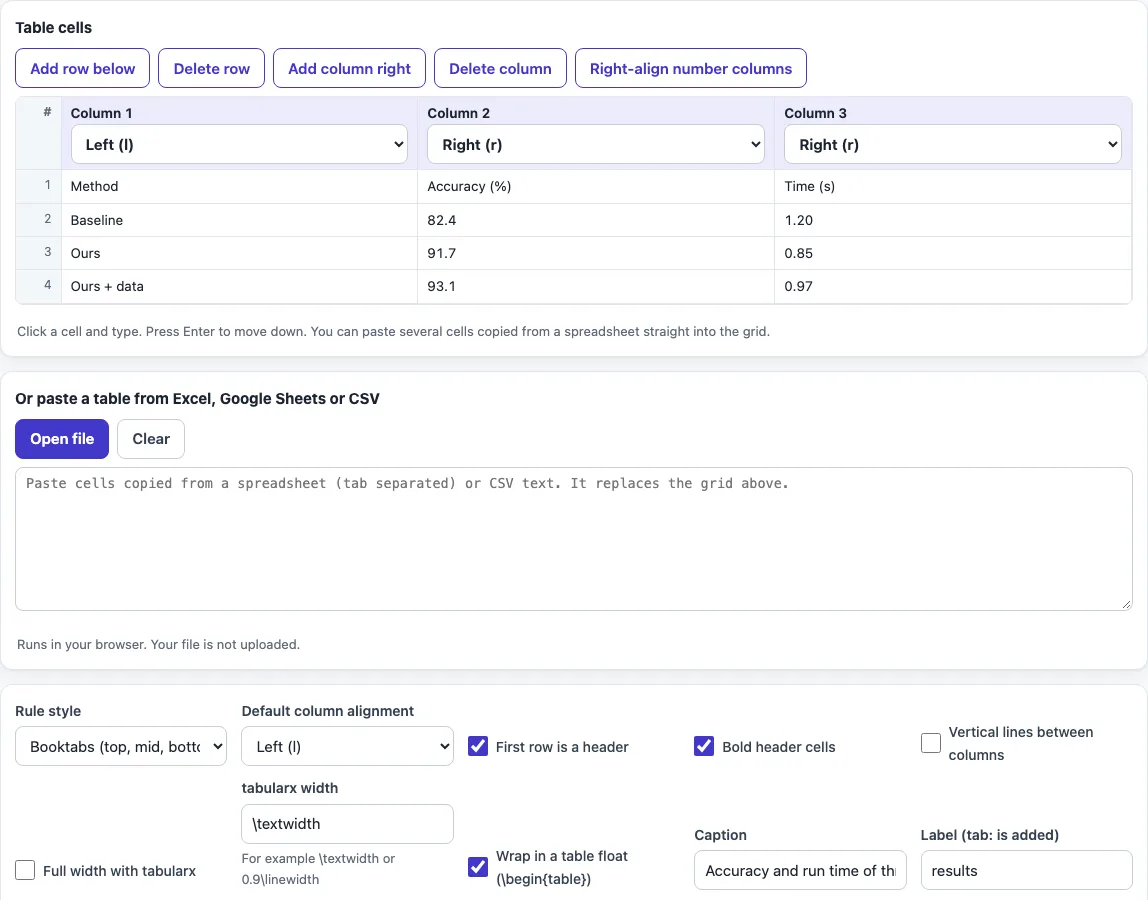
- Type your data into the grid. Use the controls to add and delete rows and columns.
- Or copy cells from Excel, Google Sheets or a CSV file and paste them into the box labelled “Or paste a table from Excel, Google Sheets or CSV”. The pasted cells replace the grid.
- Tick “First row is a header” for column titles. Tick “Bold header cells” if you want them in bold.
- Set each column’s alignment: Left (l), Centre (c), Right (r), Stretch (X, tabularx) or Fixed width (p{width}). Tick “Right-align number columns” to set r on number columns.
- Choose a rule style: Booktabs (the default), Full grid, Line under the header only, or No lines.
- Tick “Wrap in a table float” to add a caption, label, placement and caption position.
- Read the status line. It names any row with fewer cells than the table has columns, since empty cells are added to that row.
- Check the required packages listed above the code. Copy the preamble lines with the copy button, then copy the code into your document.
The result updates as you type or change an option. Your choices are kept in the page address, so a bookmarked or shared link reopens the tool with the same settings. Your table text is never put in the address.
How to make or create tables in LaTeX?
A table in LaTeX is a tabular environment. Each row holds cells separated by &, and each row ends with \\. The column specification, such as {lcr}, gives one letter per column: l for left, c for centre, r for right.
The tabular is only the grid. It has no number and no caption. To make a numbered, captioned table, wrap the tabular in a table float with \begin{table} and \end{table}. LaTeX then numbers the table, adds the caption to the list of tables, and places the float on a page where it fits. You write the cells, and LaTeX decides where the table goes.
The p{width} column type wraps text inside a fixed width. The X type from the tabularx package stretches to fill a total width, such as \textwidth. The generator writes all of this markup for you, but knowing the structure makes the code easier to edit later.
What is booktabs
booktabs is a LaTeX package for publication-quality tables. It provides \toprule, \midrule and \bottomrule for horizontal rules, which have better spacing than the \hline command. It also leaves out vertical lines, which is why the tool includes a tip that booktabs looks best without them.
To use it, add \usepackage{booktabs} to the preamble of your document. Booktabs is the default rule style in this tool. If you prefer a grid, choose Full grid, which uses \hline and vertical bars instead.
The same markup works in plain TeX editors and in online editors such as Overleaf: a table in TeX is just text, so you can paste the generated code anywhere your document is edited.
To center a table, keep \centering inside the table float rather than wrapping the tabular in a center environment, which adds extra vertical space.
Before you compile, add the package lines shown above the code to your preamble; without them LaTeX stops with an undefined control sequence error for commands such as \toprule.
Frequently asked questions
How do I center a table in LaTeX?
Wrap the table in a table float, since the generator adds \centering inside it for you. Outside a float, place the tabular inside a center environment with \begin{center} and \end{center}.
How do I copy a table from Excel into LaTeX?
Select and copy the cells in Excel or Google Sheets. Paste them into the box labelled “Or paste a table from Excel, Google Sheets or CSV”. The tab-separated cells replace the grid, and the code updates. Then set the header, alignment and rule style as needed.
Do I need to escape special characters like & or %?
No. The tool escapes the special characters \ { } $ & # ^ _ % ~ in your cells for you. If your cells already contain math or LaTeX commands, tick “Cells already contain LaTeX (do not escape)” so they are not changed.
How do I make a table that spans the full page width?
Tick “Full width with tabularx” and enter a width such as \textwidth. Only the X columns stretch to fill that width, so set at least one column to Stretch (X). The tabularx package must be loaded in your preamble.
Why does my table have empty cells?
A row with fewer cells than the table has columns gets empty cells added to it. The status line names that row. Check it against your source data, because a paste may have dropped a value.
Related tools
- LaTeX long table: use this when your table is too long to fit on one page.
- LaTeX matrix generator: use this to build a matrix for an equation rather than a table of text.
- LaTeX equation editor: use this to write the equations that appear alongside your tables.
- LaTeX symbols: use this to find the command for a symbol you want in a table cell.
- LaTeX figure generator: use this to add images, which use a float in the same way tables do.
- BibTeX generator: use this to build the reference list for a document that contains your tables.
- APA table format: use this to check the layout rules for tables in APA-style papers.