APA Figure Format (APA 7)
Add your figure number, title, image and note and copy an APA 7 formatted figure into Word or Google Docs.
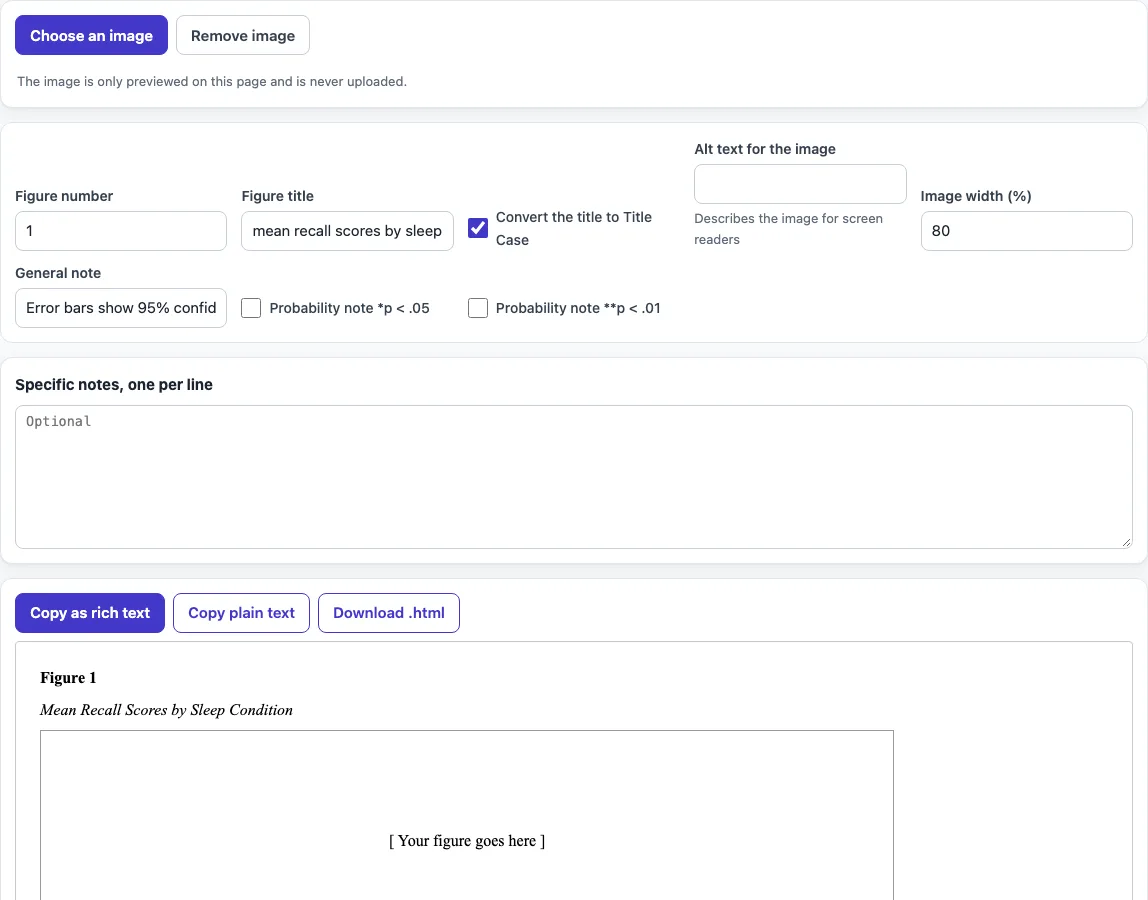
How to use the APA Figure Format tool
- Enter the number in Figure number, such as 1.
- Type the title in Figure title. Turn on Convert the title to Title Case if you want the title capitalized in APA Title Case.
- Click Choose an image to add your picture. The image is previewed on this page only and is never uploaded. Skip this step if you do not have the image yet.
- Write a short description in Alt text for the image so readers using screen readers know what the figure shows.
- Set Image width (%) to size the image.
- Type the explanation for the whole figure in General note. Use Specific notes for details that apply to one part of it.
- Check the preview, then choose an output: Copy as rich text (the image is embedded), Copy plain text, Download .html, or the LaTeX version.
The result updates as you type or change an option. Your option choices are kept in the page address, so a bookmarked or shared link reopens the tool with the same settings. Your text is never put in the address.
Change any field and the preview redraws at once, so you can try a shorter title or a different width before you copy. The checklist next to the preview lists each APA rule the layout follows.
How do I format a figure in APA 7?
In APA 7, the figure number goes in bold and sits flush left above the image. The title goes in italic Title Case on the line directly below the number, and the note sits below the image. Every element is flush left, with no indentation.
Here is the layout in order:
- Figure 1 in bold, flush left.
- The title in italic Title Case, on one double-spaced line below the number.
- The image.
- A legend, if you have one, placed inside the image itself.
- The note below the image, starting with Note. in italics.
For example, the tool’s sample reads: Figure 1, then Mean Recall Scores by Sleep Condition, then the image, then Note. Error bars show 95% confidence intervals. Before you submit, check that the image is your own work or, if it is not, that the source is cited.
Where does the figure title go in APA?
The figure title goes directly below the figure number and above the image. APA does not place it inside the image or after it. The title is italic, uses Title Case, and takes one double-spaced line.
Keep the title short and descriptive so the reader knows what the figure shows before reading the text. Describe the content, such as the variables plotted, instead of stating a conclusion. Charts and graphs are labeled the same way as any other figure, so a bar chart is “Figure 2,” not “Graph 2” or “Chart 2.” Number figures in the order they first appear in your paper.
How do I label the axes and the legend?
Axis labels and the legend belong inside the image, made in the program that drew the chart, and they use the same wording as your text. Keep the legend inside the borders of the figure, write axis labels in title case or sentence case consistently, and give units in parentheses, such as Time (s). Fonts in the figure should be large enough to read at the printed size, between 8 and 14 points.
Frequently asked questions
How do I write a figure note?
Start the note with Note. in italics, placed below the image. Use the general note for information that applies to the whole figure, such as what error bars represent. Use specific notes for details that apply to one part of the figure.
How do I label a graph or chart in APA?
Label it as a figure: bold “Figure” with its number, then an italic Title Case title above the image. Number figures consecutively in the order they appear in your paper, and refer to them by number in the text.
Do I need to cite a figure I did not make?
Yes. If the figure comes from another source, the note also carries the copyright attribution. The APA figure citation page explains that format.
Is my image uploaded when I use this tool?
No. The image is previewed on this page only and is never uploaded. The tool runs in your browser, and what you type or open is processed on your own device.
Can I use the output in a published paper?
Yes. The output, including code, references, and tables, may be used for any purpose, including published papers and commercial work, with no attribution required.
Where does the caption go in the LaTeX version?
The LaTeX version uses the graphicx and caption packages and sets the caption above the image. It makes the figure label bold and the title italic, matching the APA layout.
Related tools
- LaTeX figure generator: Use this when you are writing your paper in LaTeX and need figure code.
- APA table format: Use this to learn how tables are laid out, since tables follow separate rules from figures.
- Cite a table in APA: Use this when you need the citation format for a table you are referring to.
- APA figure citation: Use this when a figure comes from another source and needs an attribution.
- APA table of contents: Use this to set up the list of figures and tables at the front of your paper.
- APA headings: Use this to format the section headings that surround your figures in the body text.