APA Headings: Format Each Heading for a Research Paper
Type your headings, mark their level and get APA 7 formatting with automatic Title Case.
This tool formats the headings of a research paper in APA 7 style. You type your headings and text, mark each heading’s level, and see the result as you work.
It runs in your web browser, so what you type is processed on your own device and nothing is uploaded. It is free, and no account or sign-up is needed.
Use it when you need APA headings that follow the APA 7 manual, with five apa heading levels that range from a centred bold title down to indented run-in headings. You can check the layout in an APA preview, then copy the result into Word or Google Docs, copy it as plain text, or get LaTeX code. The sections below explain each level, so you can decide which level each part of your paper needs before you start.
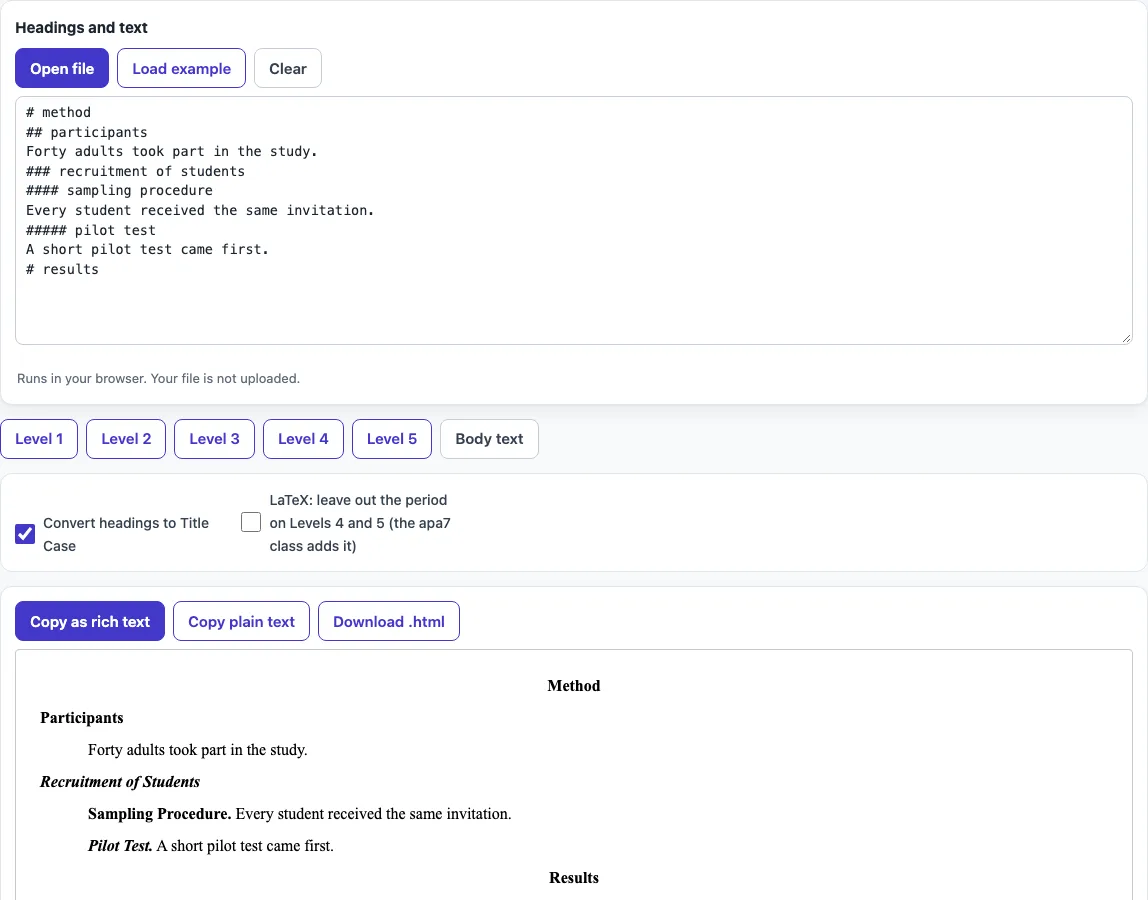
How to use the APA headings tool
- Type your headings and the text of each section into the input box.
- Mark each heading’s level by starting its line with # for Level 1, ## for Level 2, and so on up to ##### for Level 5.
- If you prefer buttons, place your cursor on the line and click ‘Level 1’ to ‘Level 5’, or ‘Body text’ for ordinary paragraphs.
- Turn on ‘Convert headings to Title Case’ if you want the tool to apply APA capitalisation to every heading.
- Read any warnings. The tool flags a heading that skips a level, or a paper that does not start with Level 1.
- Check the result in the APA preview. It updates as you type or change an option.
- Choose your output: copy as rich text for Word or Google Docs, copy plain text, or use the LaTeX version, which maps levels 1 to 5 to
\section,\subsection,\subsubsection,\paragraphand\subparagraph.
The tool keeps your option choices in the page address. A bookmarked or shared link reopens the tool with the same settings. Your text is never placed in the address, so only the settings travel with the link.
A one-line table on the page sums up the format of all five levels, so you can check a heading against it.
What are the five APA heading levels?
APA 7 has five heading levels, and each one has its own look. Level 1 is centred, bold and in Title Case. Level 2 is flush left, bold and in Title Case. Level 3 is flush left, bold italic and in Title Case. Text after Levels 1 to 3 starts a new paragraph.
Level 4 is indented 0.5 inches, bold and in Title Case, and it ends with a period. Level 5 is indented 0.5 inches, bold italic and in Title Case, and it also ends with a period. For Levels 4 and 5, the paragraph text continues on the same line as the heading.
How do I format headings in an APA research paper?
Start with a Level 1 heading and use levels in order, so you never jump from Level 1 straight to Level 3. A section can have one level of subheadings or several, depending on how much detail it needs.
For example, the input ‘# method’, ‘## participants’, ‘### recruitment of older adults’ and ‘#### sampling procedure’ followed by ‘We recruited 40 people.’ produces Method as a centred bold title, Participants as a flush-left bold heading, Recruitment of Older Adults in bold italic, and ‘Sampling Procedure. We recruited 40 people.’ on one indented line.
Does APA use a heading for the introduction?
No. APA does not put an ‘Introduction’ heading at the top of the introduction. The paper title, repeated in bold and centred at the start of the text, plays that role. Other main sections, such as Method, Results and Discussion, do get headings.
What is Title Case in APA?
Title Case is the capitalisation style APA uses for headings at all five levels. Capitalise the first word, every word of four letters or more, and every major word, including short verbs such as Is and Be, pronouns and adverbs. Also capitalise the first word after a colon and both parts of a hyphenated major word.
Lowercase only short minor words of three letters or fewer, such as and, but, for, the, of, in and to, when they are not the first word. Examples are ‘What Is It Like to Be a Bat?’ and ‘A Self-Report Measure of Well-Being: An Exploratory Study’. The ‘Convert headings to Title Case’ option applies these rules for you.
Frequently asked questions
Can I skip a heading level?
Avoid it. A heading that skips a level, such as Level 3 directly after Level 1, triggers a warning in the tool. Add the missing level so the outline reads in order.
Does the tool upload my paper?
No. The tool runs in your web browser, so what you type or open is processed on your own device. Nothing is uploaded, and you do not need an account.
Do I need to type the period for Level 4 and Level 5 headings?
For plain copies, the period is part of the heading text, and the tool adds it for you. If you use the LaTeX output with the apa7 class, the class adds the period itself, so you should not add another.
Can I share my settings with a colleague?
Yes. Your option choices are kept in the page address, so a shared link reopens the tool with the same settings. Your text is not placed in the address, so you will need to send the text separately.
Can I use the output in a published paper?
Yes. The output, including code, references and tables, may be used for any purpose, including published papers and commercial work, with no attribution required.
Related tools
- LaTeX font size: use this when you need to set the body text size in a LaTeX document.
- BibTeX to APA: use this when your references are stored as BibTeX entries.
- APA table format: use this when your paper includes tables that need APA layout.
- Cite a table in APA: use this when you need to refer to a table in your text.
- APA figure format: use this when your paper includes figures.
- APA table of contents: use this when you need a contents page that lists your headings.