Cite a Table in APA (Table Note Generator)
Enter where the table comes from and copy the APA 7 note, the in-text citations and the reference list entry.
This tool builds everything you need to cite a table taken from another source in APA 7 style, whether you are reproducing it or referencing a table in APA as an adaptation. It creates the copyright note that goes under the table, ways to mention the table in your text, a parenthetical and a narrative citation, and the reference list entry.
You enter the source details, choose the copyright status, and copy the result as rich text or plain text. It runs in your web browser, so what you type is processed on your own device and nothing is uploaded. It is free, and no account or sign-up is needed.
Choose “From” or “Adapted from” and the copyright status, and every line updates together.
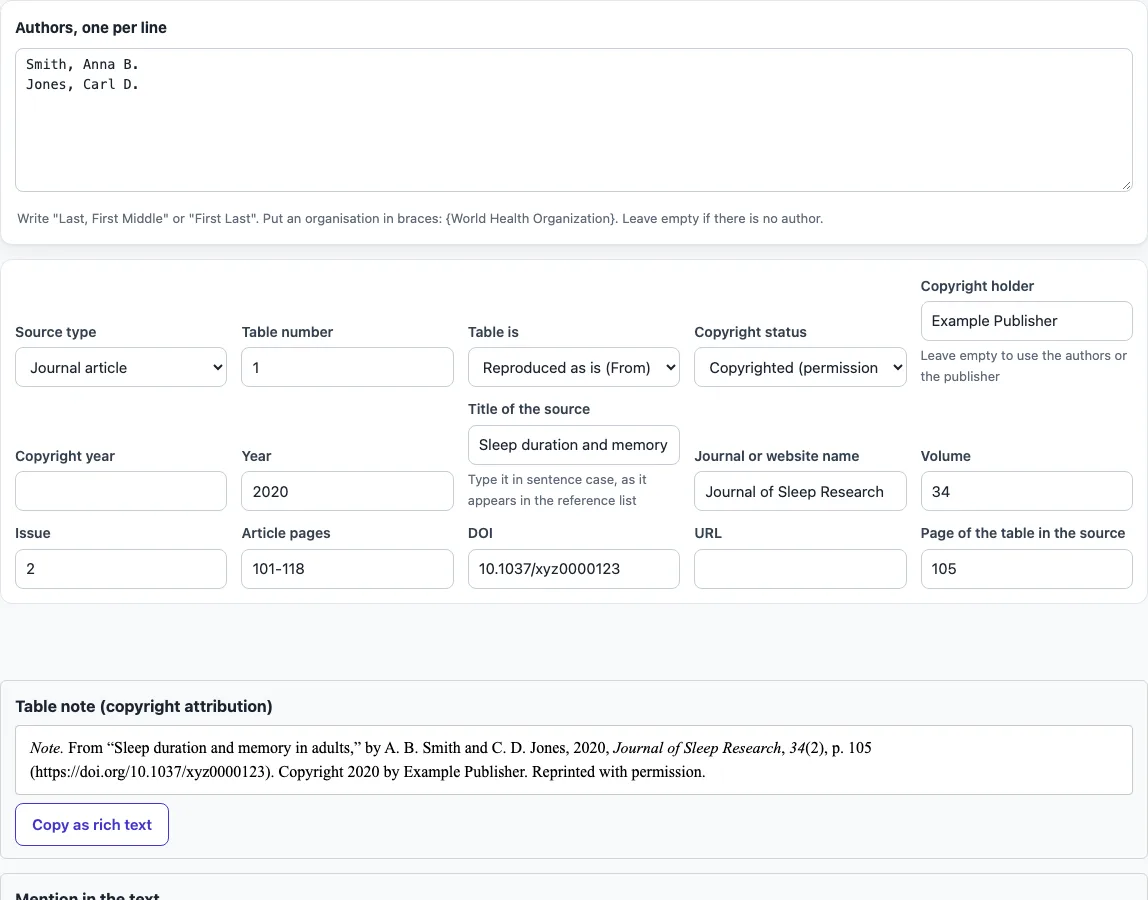
How to use the APA table citation tool
- Choose a Source type: journal article, book, webpage or report.
- In Authors, one per line, enter each author as Last, First or First Last. For an organisation, put its name in braces, such as {World Health Organization}.
- Enter the year and the title. Type the title in sentence case, as it should appear in the reference list.
- Fill in the fields the source needs: journal or website name, volume, issue, pages, publisher, edition, report number, DOI or URL.
- Enter the page where the table appears in the source.
- Choose a Copyright status:
- Copyrighted (permission needed): also enter the Copyright holder (leave it empty to use the authors or publisher) and the Copyright year.
- Creative Commons licence: enter the licence name, for example CC BY 4.0.
- Public domain: no further copyright fields are needed.
- Read the output: the note, the in-text wording, the parenthetical and narrative citations, and the reference entry.
- Click Copy as rich text to keep italics when you paste into Word or Google Docs, or Copy plain text for other editors.
The result updates as you type or change an option. Your option choices are kept in the page address, so a bookmarked or shared link reopens the tool with the same settings. Your typed text is never placed in the address.
How do I cite a table from another source in APA 7?
Put a note directly under the table that names the source, and list that source in your reference list. The note begins with Note. in italics, followed by the word From or Adapted from, the title in quotation marks, the authors with initials first, the year, and the source in italics with its volume, issue, page and DOI or URL.
After that, the note adds the copyright line. For copyrighted material, it reads “Copyright [year] by [holder].” If you obtained permission, add “Reprinted with permission.” or “Adapted with permission.” Creative Commons items end with the licence name, such as CC BY 4.0. Public-domain items end with “In the public domain.”
In your text, refer to the table by number, for example “As shown in Table 1” or “(see Table 1)”. Then cite the source as you would any other source.
What is the difference between From and Adapted from?
Use From when you reproduce the table exactly as it appears in the source. Use Adapted from when you changed it, for example by removing rows or columns, recalculating values or reformatting it.
A table you made from your own data needs no citation. A table you built from data taken from a source is an adaptation, so it uses Adapted from and cites that source. Choosing the wrong word is a common mistake, so check how much you changed before you write the note.
The same pattern works for a book (the title in italics, then the publisher) and for a webpage (the page title in italics, then the website name and URL); choose the source type and the tool sets the order and italics for you.
If you only discuss a table from a source without reproducing it, you do not need a note: cite the source in the sentence, for example (Smith & Jones, 2020, p. 105), and include it in the reference list.
Frequently asked questions
What goes in the table note for a reproduced table?
The note follows the pattern described above and starts with Note. in italics. For a journal article reproduced with permission from Example Publisher, the tool produces: Note. From “Sleep duration and memory in adults,” by A. B. Smith and C. D. Jones, 2020, Journal of Sleep Research, 34(2), p. 105 (https://doi.org/10.1037/xyz0000123). Copyright 2020 by Example Publisher. Reprinted with permission.
Do I also need a reference list entry?
Yes. The note under the table does not replace the reference list entry. The reference for the example above is: Smith, A. B., & Jones, C. D. (2020). Sleep duration and memory in adults. Journal of Sleep Research, 34(2), 101–118. https://doi.org/10.1037/xyz0000123
When do I need permission to reproduce a table?
For copyrighted material outside the public domain or an open licence, you need the copyright holder’s permission to reproduce it in a published work. Many student papers fall under fair use, but follow your institution’s rule. This is general guidance, not legal advice.
Do I need to cite a table I made from my own data?
No. A table built from your own data needs no citation and no note.
Can I use the output in a published paper?
Yes. The output may be used for any purpose, including published papers and commercial work, with no attribution required.
Related tools
- LaTeX table generator: use it to build a table in LaTeX when you need code rather than an APA citation.
- APA table format: check the layout rules for the table itself, such as numbering and titles.
- APA figure citation: use it when the item you are citing is a figure, chart or photograph rather than a table.
- APA figure format: check how to lay out a figure once you have cited it.
- APA headings: check heading levels when your tables sit under sections in your paper.