APA Style Table of Contents Generator
Type your headings with levels and page numbers and copy an APA-styled table of contents with dot leaders.
This free tool turns a list of headings and page numbers into a table of contents formatted in the APA 7 style. You type one heading per line with its page number at the end, and the preview shows the finished layout, including the title, the indented levels, and dot leaders that lead to the page numbers.
It runs entirely in your web browser, so what you type is processed on your own device and nothing is uploaded. No account or sign-up is needed. The result updates as you type or change an option, so you can see the effect of each setting straight away.
Use it to build an APA 7 table of contents, an APA format table of contents, or a sample APA table of contents to check your own layout against.
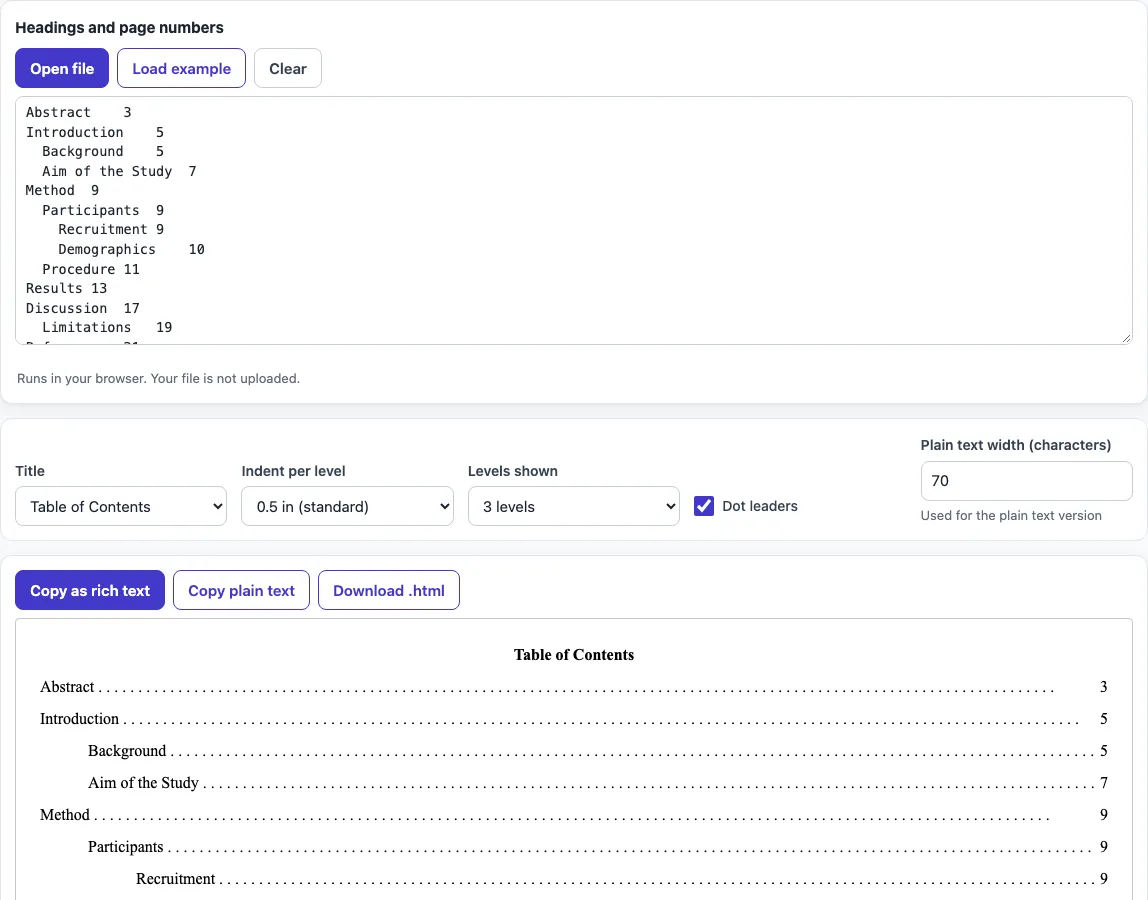
How to use the APA table of contents tool
- Click into the input box and type one heading per line, using the exact wording and Title Case from your paper.
- Mark each heading’s level with # marks: # for Level 1, ## for Level 2, ### for Level 3, and so on. You can also show levels by indenting the lines.
- Add each page number at the end of its line, after dots, a tab, two or more spaces, or a | character.
- Choose a title from the Title option: Table of Contents, Contents, or none.
- Set Indent per level to 0.5 in (the standard), 0.25 in, 0.75 in, or 1 in.
- Set Levels shown to a number from 2 to 5, and turn Dot leaders on or off.
- If you need the plain text version to fit a set width, change Plain text width (characters).
- Check the preview, then choose Copy as rich text for Word or Google Docs, Copy plain text with dot leaders, or Download .html.
The preview updates as you change any setting, so you can adjust the layout before copying. Your option choices are kept in the page address, so a bookmarked or shared link reopens the tool with the same settings. Your text is never placed in the address, so you will need to paste your headings again when you open a shared link.
Does an APA paper need a table of contents?
APA 7 does not require a table of contents in student papers or journal articles. Theses, dissertations, long reports, or your institution may ask for one, so check your assignment guidelines or program handbook before you add one. If a table of contents is requested, it should follow the APA look for headings, so each entry reflects the same heading levels used in the body of the paper.
How do I format a table of contents in APA style?
Start with a title, which the tool can set to Table of Contents or Contents. List the headings in the order they appear in the paper. Each entry must match its heading word for word and use the same Title Case, so a Level 2 heading in the body should not be shortened in the contents.
Indent each lower level so the hierarchy is easy to see. The standard indent is 0.5 inches per level, and entries stay flush left at their own level. Each page number sits at the right margin, joined to its entry by dot leaders. Use the same font as the rest of the paper; the preview uses Times New Roman 12 pt.
For example, these input lines:
# Introduction  1
## Background .... 2
# Method | 5
produce this plain text version:
Introduction ...... 1
    Background ...... 2
Method ...... 5
Page numbers in the contents should be the pages where each heading starts in the final, paginated paper, so build or update the contents last, after the text, tables and figures are in place. In Word, an automatic table of contents does this for you once your headings use Heading styles.
Keep the numbering simple: list front matter such as the abstract only if your institution asks for it, and list appendices at the end with their titles, for example Appendix A: Survey Questions.
Frequently asked questions
What does an APA table of contents look like?
It has a bold, centred title, entries flush left, sub-levels indented, and dot leaders that run to right-aligned page numbers. The preview on this page shows the finished layout before you copy it.
How do I make a table of contents in Word?
For a long document, apply the Heading 1 to Heading 5 styles to your headings. Then go to References > Table of Contents and insert Word’s automatic table. Its page numbers update when your paper changes.
Should the title say “Table of Contents” or “Contents”?
Use the title your institution or instructor asks for. The Title option lets you choose Table of Contents, Contents, or no title at all.
How many heading levels should I show?
Set Levels shown to match the heading levels in your paper, from 2 to 5. Showing only the levels you use keeps the contents easy to read.
Can I use the output in a published paper?
Yes. The output may be used for any purpose, including published papers and commercial work, and no attribution is required.
Does the tool upload my headings?
No. The tool runs in your web browser, and what you type is processed on your own device.
Related tools
- LaTeX font size: use this when you need to change the font size in a LaTeX document.
- BibTeX to APA: use this to convert BibTeX entries into APA-style references.
- APA table format: use this to check how a table should be laid out in APA style.
- Cite a table in APA: use this to write the in-text and reference list citation for a table.
- APA figure format: use this to set up figures and their captions in APA style.
- APA headings: use this to check the five heading levels before you build your table of contents.