BibTeX Formatter and Cleaner
Paste a messy .bib file and get it back tidy: consistent fields, sorted entries, duplicates removed and problems listed.
The BibTeX formatter is a free tool that reads a .bib file and writes it back tidy and consistent. It works as a BibTeX cleaner and a BibTeX tidy tool: it sets the indentation, aligns the equals signs, orders and sorts fields and entries, and can remove duplicates and empty fields.
Everything runs in your web browser. What you type or open is processed on your own device, nothing is uploaded, and no account or sign-up is needed.
The tool also reports problems with line numbers, including entries it cannot read, warnings such as undefined macros or a field given twice, and missing required fields. You can use it to format BibTeX before submitting a paper or to clean up an old reference list.
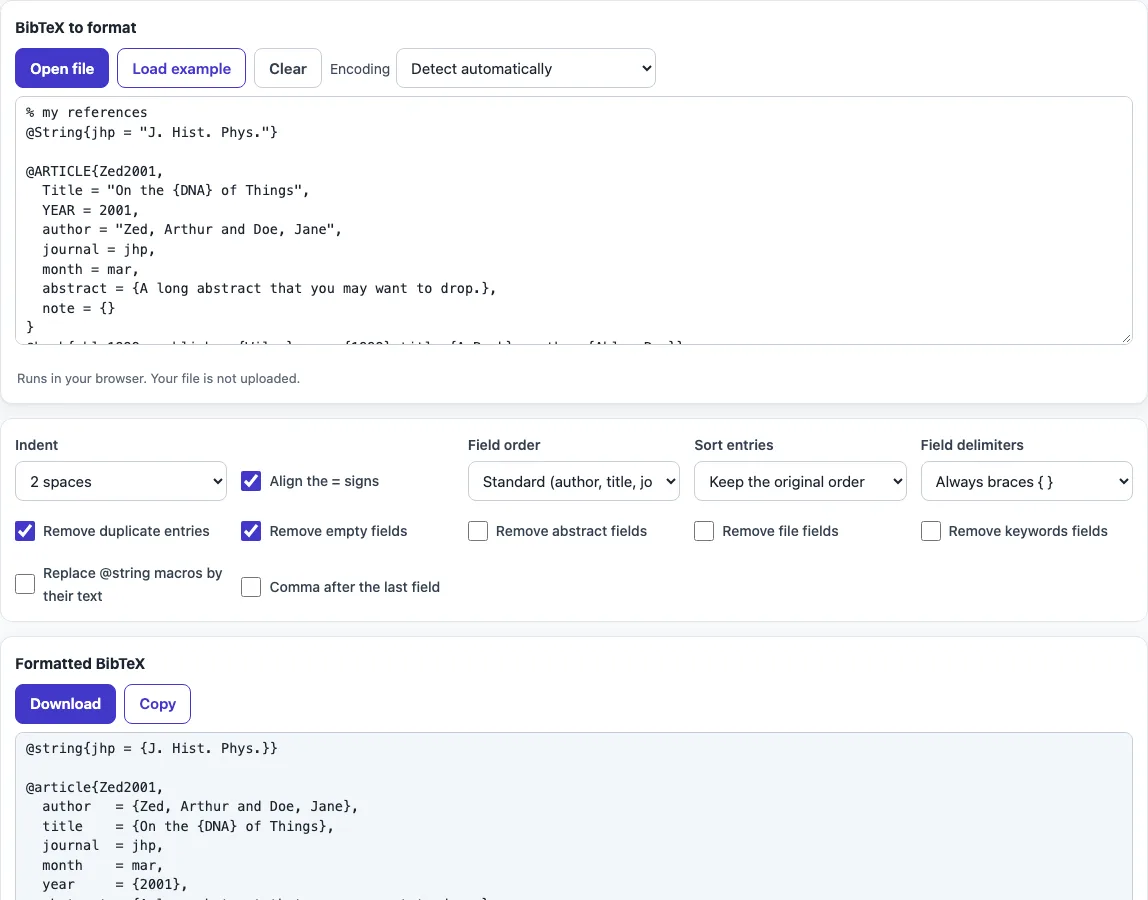
How to use the BibTeX formatter
- Open your .bib file in the tool, or type or paste its contents into the input.
- Choose an Indent setting: 2 spaces, 4 spaces, or tab.
- Turn on Align the = signs if you want the equals signs in a single column.
- Pick a Field order: the standard order (author, title, journal and so on), or keep your original order.
- Pick a Sort entries option: keep, by citation key, by year, by first author, or by entry type.
- Set Field delimiters to always braces, or keep quotes and numbers.
- Tick the cleanup options you need: Remove duplicate entries, Remove empty fields, Remove abstract fields, Remove file fields, Remove keywords fields, Replace @string macros by their text, and Comma after the last field.
- Read the report and fix any unreadable entries, warnings, or missing required fields at the line numbers shown.
- Use the formatted output, which updates as you change the input or any option.
Your option choices are kept in the page address, so a bookmarked or shared link reopens the tool with the same settings. Your text is never put in the address.
The input accepts a whole .bib file at once, including @string, @preamble and @comment blocks. Copy the formatted result or download it and replace your old file; keep a copy of the original until you have compiled once.
How do I clean up a messy .bib file?
Run the file through the formatter with the options set to the layout you want, and the tool rewrites every entry with the same indentation, lower-case field names, and consistent delimiters. Messy files usually differ in spacing, capitalisation and quoting, and a formatter removes those differences without changing the content.
Each BibTeX entry has the form @type{citationkey, field = {value}, …}. The entry type, such as @article or @book, comes after the @ sign, followed by a citation key and then the fields, separated by commas. Entries the tool cannot read are left out of the output, so check the report for their line numbers.
How do I remove duplicate BibTeX entries?
Turn on Remove duplicate entries and the tool drops repeated entries, keeping the first one it finds. Two entries count as duplicates when they have the same citation key, the same DOI, or the same title and year. When comparing titles, case and punctuation are ignored.
Every removed duplicate is listed with its line number, so you can confirm that nothing important was lost before you use the cleaned file.
Which fields are required for each entry type?
Each BibTeX entry type expects a set of required fields, and reference styles rely on them to print a complete citation. For example, @article needs author, title, journal and year. @book needs author or editor, title, publisher and year. @inproceedings needs author, title, booktitle and year.
The tool checks these lists for you and reports each missing field with its line number, such as “@article needs journal”. Add the missing field and format the file again to clear the warning.
Braces or quotes in BibTeX fields?
Both braces and quotes are valid BibTeX delimiters, but braces are the safer choice. A value in quotes cannot contain a bare double quote, while a value in braces can. Braces also protect capital letters inside a value, so a title written as {NASA} or {DNA} keeps its capitals when a bibliography style changes the case of titles.
Choose always braces under Field delimiters to convert every value to braces. Choose keep quotes and numbers if you want the original style left unchanged. Plain numbers, such as year = 2020, do not need delimiters.
Frequently asked questions
What does “Replace @string macros by their text” do?
A .bib file can define abbreviations with @string, for example a journal name used in many entries. With this option on, every use of the macro is replaced by its full text and the @string definitions are no longer needed; with it off, the macros are kept.
Does the BibTeX formatter upload my file?
No. The tool runs entirely in your web browser, so what you type or open is processed on your own device. Nothing is uploaded, and no account or sign-up is needed.
Can I format a .bib file with hundreds of entries?
Yes. A large .bib file with hundreds of entries is formatted at once, and the result updates as you change the options.
Will formatting change what my references say?
Only if you turn on options that remove content. Remove abstract fields, Remove file fields, Remove keywords fields, Remove empty fields and Remove duplicate entries delete data. The other options change layout, order and delimiters, not the values.
Does the formatter fix broken braces?
No. It reports an entry it cannot read, with its line number, and leaves that entry out of the output, so fix the braces in your original file and paste it again.
Can I keep my own field order?
Yes. Set Field order to keep the original order; only the layout, case of field names and delimiters then change.
Related tools
- BibTeX generator: use it when you need to create a new BibTeX entry from scratch.
- BibTeX to APA: use it when your reference list must follow APA style.
- BibTeX to MLA: use it when your reference list must follow MLA style.
- BibTeX to IEEE: use it when your reference list must follow IEEE style.
- BibTeX for a website: use it when you need a BibTeX entry for an online source.
- LaTeX long table: use it when you need to build a long table in a LaTeX document.