BibTeX Generator
Choose the entry type, fill in the fields and copy a ready BibTeX entry with its citation key and \cite command.
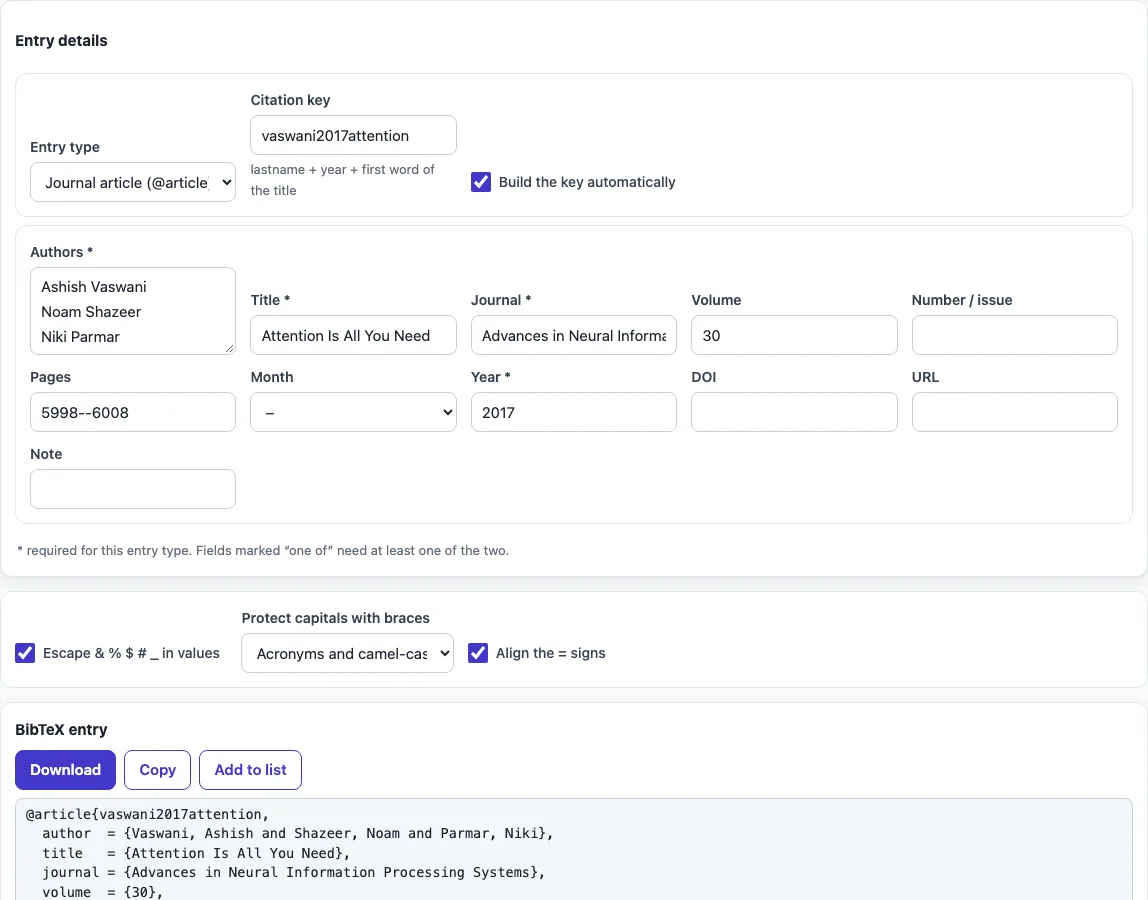
How to use the BibTeX generator
- Choose an entry type from the Entry type list, such as Journal article (@article), Book (@book) or Conference paper (@inproceedings).
- Look at the fields the form shows for that type. Fields marked with * are required. Fields that do not belong to the type are left out of the output.
- Enter the authors or editors, one name per line, as “First Last” or “Last, First”. Put organisations in braces, for example {World Health Organization}.
- Fill in the title, year and the other fields. The status line lists any required fields that are still missing.
- Check the citation key. It is built automatically, but you can turn off “Build the key automatically” and type your own.
- Set the handling options: “Escape & % $ # _ in values” is on by default, and “Protect capitals with braces” controls how capital letters in titles are kept.
- Copy the entry from the output. To build a list, click “Add to list”, then click “All entries (.bib)” to download the entries as one .bib file.
“Align the = signs” gives the output a tidier layout. Your option choices are kept in the page address, so a bookmarked or shared link reopens the tool with the same settings. Your text is never put in the address.
How to cite in LaTeX?
To cite in LaTeX, save your entries in a file called refs.bib, then write \cite{key} in your text, where key is the citation key from the entry. At the end of the document, add \bibliographystyle{plain} (or another style) and \bibliography{refs}. Compile in this order: LaTeX, then BibTeX, then LaTeX twice. The second and third runs resolve the citations and the reference numbers.
If you use biblatex instead, add \addbibresource{refs.bib} to the preamble and \printbibliography where the list should appear. The “Cite it in LaTeX with” line in the tool shows the \cite{key} command for the current entry, with a copy button.
Which fields does each BibTeX entry type need?
Each entry type has a set of required fields, based on the BibTeX documentation. An @article needs author, title, journal and year. A @book needs author or editor, title, publisher and year. An @inproceedings needs author, title, booktitle and year. A @phdthesis needs author, title, school and year. A @techreport needs author, title, institution and year.
The form follows these rules for you. It marks the required fields with *, so you can see what must be filled in before the entry is complete. Fields that a type does not use are removed from the output, which keeps the entry free of settings that a style would ignore.
What does a BibTeX entry look like?
A .bib (BibTeX) entry starts with the type and the key, followed by fields: @article{smith2020graphs, author = {Smith, Jane}, title = {Graphs in practice}, journal = {...}, year = {2020} }. When you generate BibTeX with this form, the output follows exactly this layout, with one field per line. BibTeX is the bibliography program that comes with TeX and LaTeX: it reads the .bib file, picks the entries you cited, and formats them with the style you chose, so one bib file can serve many papers.
Frequently asked questions
What is a citation key, and how is it made?
A citation key is the label you use in \cite{} to point to an entry. By default, the tool builds it from the last name of the first author, the year, and the first word of the title, in lowercase with accents removed. For example, a 2020 paper by Jane Smith titled “Graphs in practice” gets the key smith2020graphs. You can type your own key instead by turning off the automatic option.
How do I cite a website in BibTeX?
Choose “Web page for biblatex (@online)” as the entry type if you use biblatex. Fill in the author, title, year and URL fields that the form shows. If you use plain BibTeX, choose “Anything else (@misc)” instead. For more detail, see the BibTeX for a website page.
Why are the capital letters in my title changed?
Many citation styles lowercase titles automatically. Set “Protect capitals with braces” to “every capitalised word except the first” so proper nouns keep their capitals, or to “acronyms and camel-case words” to protect terms such as {DNA}.
Does the tool upload my references?
No. The tool runs in your web browser, and what you type is processed on your own device. Nothing is uploaded, and you do not need an account.
Can I use the output in a published paper?
Yes. The output may be used for any purpose, including published papers and commercial work, and no attribution is required.
Can I convert the entries to APA, MLA or IEEE style?
This tool produces BibTeX only. If you need a formatted reference list in another style, use the conversion pages listed in the related tools below.
Related tools
- LaTeX table generator: use it to build a LaTeX table for your document.
- BibTeX formatter: use it to tidy up an existing BibTeX file.
- BibTeX to APA: use it when your journal or class asks for APA style.
- BibTeX to MLA: use it when your work needs MLA style references.
- BibTeX to IEEE: use it when your target venue asks for IEEE style.
- BibTeX for a website: use it when your source is a web page and you need the right entry for it.