BibTeX to APA Converter
Paste BibTeX entries and copy a formatted APA 7 reference list, plus the in-text citation for each source.
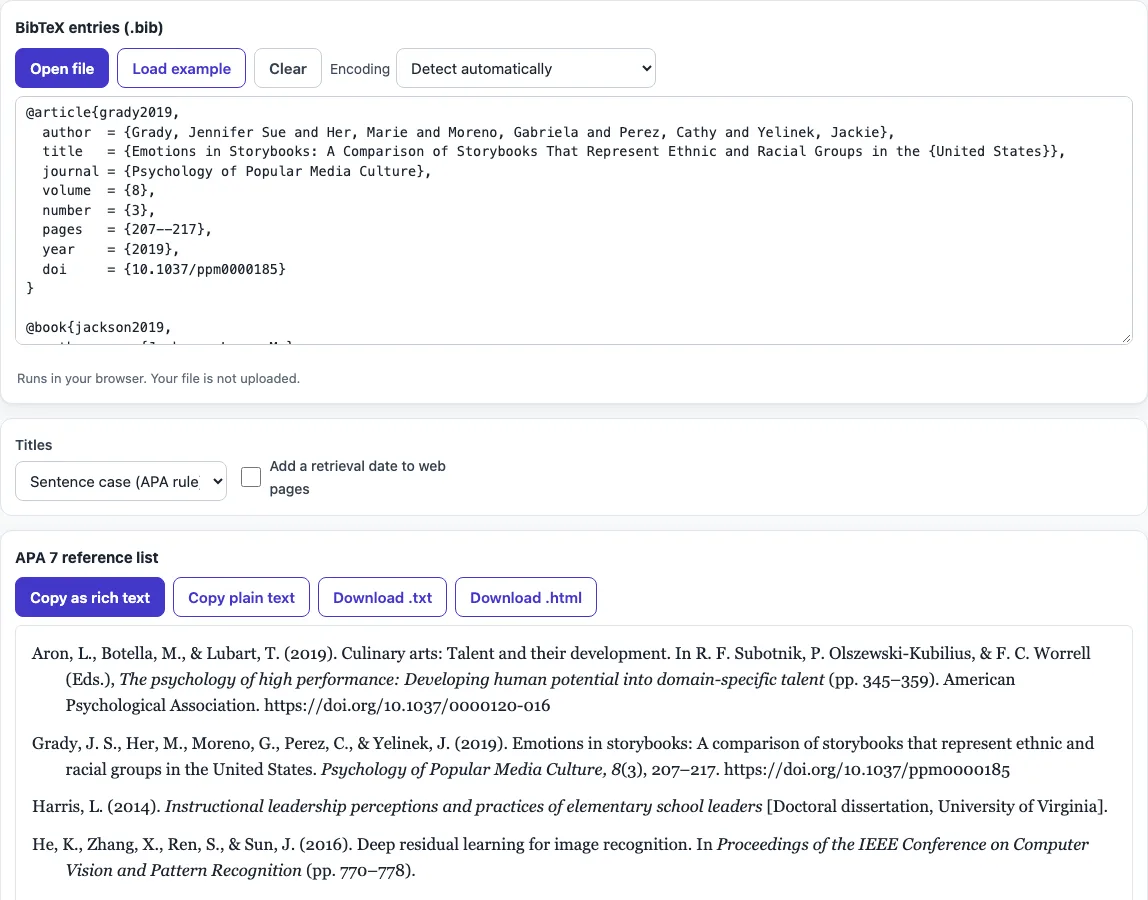
How to use the BibTeX to APA converter
- Paste one or more BibTeX entries into the input box, or open a .bib file. The parser reads entry types such as @article, @book and @inproceedings.
- Look at the preview. The reference list updates as you type or change an option.
- Check for entries the tool could not read. It reports each one with its line number and still formats the rest.
- Choose a title option: Sentence case (APA rule) or Keep as written in the .bib.
- Turn on Add a retrieval date to web pages only if you are citing a page designed to change over time.
- Review the in-text citation table, which lists parenthetical and narrative forms for each citation key.
- Copy the result with Copy as rich text, which keeps italics when pasted into Word or Google Docs. Use Copy plain text for other places.
- Or use Download .txt or Download .html to save the list.
Your option choices are kept in the page address. Bookmark or share the link to reopen the tool with the same settings. Your text is never placed in the address.
If a reference looks wrong, fix the entry in your .bib file rather than the output, so the next export is right too.
How do I convert BibTeX to APA style?
The tool reads each BibTeX field and places it in APA 7 order: authors, year in parentheses, title, then source details. Journal names and volume numbers are set in italics, and the issue number goes in parentheses after the volume. Page ranges use an en dash, and DOIs are written as https://doi.org/ links.
LaTeX markup is converted to normal characters first. For example, {"o} becomes ö, \& becomes &, and – becomes an en dash.
How does APA 7 format authors in the reference list?
APA 7 lists each author as surname followed by initials, with an ampersand before the last author. Up to 20 authors are listed in full. With 21 or more, the tool gives the first 19 authors, an ellipsis, and the last author.
Names are read the BibTeX way, so ‘Last, First’ and ‘First Last’ both work. An organisation written in double braces, such as {World Health Organization}, stays as one name.
In-text citations are shorter than the reference list. Use the form (Grady et al., 2019) for three or more authors, (Chen & Müller, 2020) for two, and the narrative form Jackson (2019) for one author. The table generated by the tool shows these forms for each key.
Why are my titles changed to lowercase?
APA 7 uses sentence case for article and book titles. This means only the first word, the first word after a colon, and proper nouns are capitalised. The tool applies this when Sentence case (APA rule) is selected.
Some words keep their capitals automatically. These are words protected with braces, all-caps acronyms, and words with inner capitals. A proper noun that is not braced will be lowercased, so write it as {United States} in the .bib, or check it by hand. Proceedings titles, which are conference names, keep their capitals because they are proper names. If you want the title exactly as typed, choose Keep as written in the .bib.
Do I need a retrieval date?
Usually not. APA 7 uses a retrieval date only for pages designed to change over time, such as a wiki or a live dashboard. Most sources, including books and journal articles with a DOI, do not need one.
Turn on Add a retrieval date to web pages only for sources of that kind.
Frequently asked questions
Is my .bib file uploaded anywhere?
No. The tool runs in your browser, and what you paste or open is processed on your own device. No account is needed to use it.
Can I use the formatted references in a published paper?
Yes. The output may be used for any purpose, including published papers and commercial work, and no attribution is required.
Why is one of my entries missing from the list?
The parser could not read that entry. The tool reports it with its line number, then formats the other entries. Check the braces, quotes and commas at that line, then paste the corrected entry again.
Does the tool handle accented letters and LaTeX symbols?
Yes. LaTeX such as {"o} is converted to ö, {'e} to é, and \& to &. Your references then show normal characters.
Is there a cost to use it?
No. The tool is free, and you do not need to sign up.
Does the tool sort the references for me?
Yes. APA lists references alphabetically by the first author’s surname, and the tool sorts them that way whatever order your .bib file is in.
What if an entry has no year?
APA uses (n.d.) for “no date”, and the in-text citation becomes (Author, n.d.).
Related tools
- BibTeX generator: Use this when you need to create a BibTeX entry from scratch.
- BibTeX formatter: Use this to tidy the layout of a .bib file before you convert it.
- BibTeX to MLA: Use this when your course or journal requires MLA style instead of APA.
- BibTeX to IEEE: Use this when your target publication uses IEEE numbered references.
- Cite a table in APA: Use this to see how to cite a table you are referring to in your paper.
- APA headings: Use this to check the heading levels for the structure of your APA paper.