BibTeX to MLA Converter
Paste BibTeX entries and copy an MLA 9 Works Cited list with hanging indents and in-text citations.
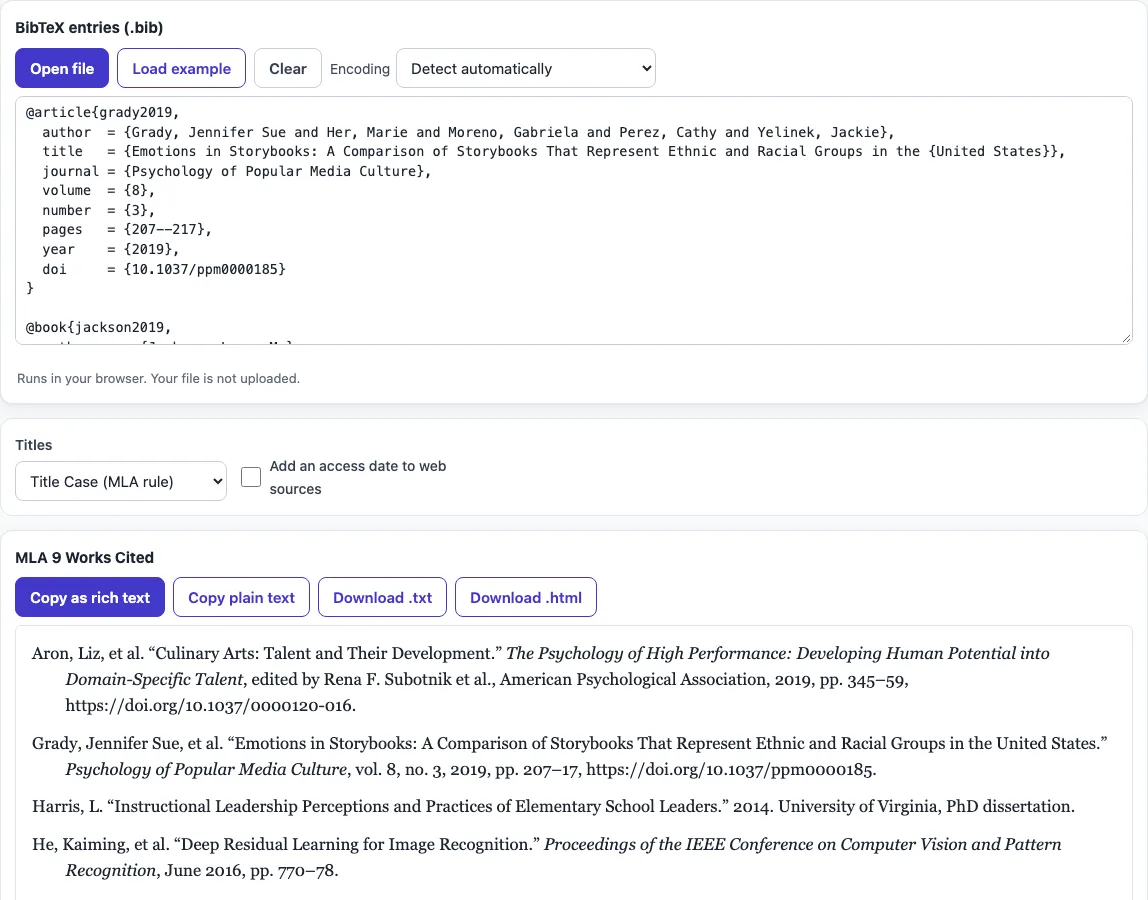
This tool converts BibTeX entries into an MLA 9 Works Cited list. Paste one or more entries, or open a .bib file, and it sorts the list alphabetically, shows it with a hanging indent in the preview, and produces in-text citations as well. It reads common entry types such as @article, @book and @inproceedings, and it cleans up LaTeX characters so accents, dashes and capitals come out correctly.
The tool runs entirely in your web browser. What you paste or open is processed on your own device, and nothing is uploaded. It is free, and no account or sign-up is needed. The result updates as you type, so you can see each change straight away.
How to use the BibTeX to MLA tool?
- Paste one or more BibTeX entries into the input area, or open a .bib file from your device.
- Look at the formatted list. It updates as you type. If an entry cannot be read, the tool reports it with its line number and still formats the rest.
- Choose a title option. Title Case (MLA rule) puts titles into MLA title case. Keep as written in the .bib leaves them exactly as you typed them.
- Tick Add an access date to web sources if you want one. This is optional in MLA 9.
- Check the list. Entries are in alphabetical order with a hanging indent.
- Copy or save the list. Copy as rich text keeps italics when you paste into Word or Google Docs. Copy plain text gives you unformatted text. Download .txt or Download .html saves a file.
Your option choices are kept in the page address, so a bookmarked or shared link reopens the tool with the same settings. Your text is never put in the address, so anyone opening a shared link will need to paste their entries again.
Check the in-text citation table under the list: MLA cites the author’s surname, as in (Jackson), and you add the page number when you quote, as in (Jackson 45).
How do I convert BibTeX to MLA style?
Paste your BibTeX entries or open a .bib file, and the tool rewrites each entry as an MLA 9 Works Cited entry. It reads the fields in each entry, such as author, title, journal, volume, number, pages and DOI, and places them in the order MLA 9 uses.
Each entry type follows its own pattern. An article shows the author, the article title in quotation marks, the journal in italics, then vol., no., year, pp. and a DOI link. Page ranges are shortened, so 207–217 becomes 207–17.
Before formatting, the tool also cleans up the LaTeX in the file. {"o} becomes ö, \& becomes &, and – becomes an en dash. Words in braces, such as {United States}, keep their capitals.
How does MLA 9 list two or more authors?
For two authors, MLA 9 writes the first author as Last, First and the second as First Last, joined by “and.” In the example, Li Chen and Hans Müller appear as “Chen, Li, and Hans Müller.”
For three or more authors, MLA 9 gives only the first author, followed by “et al.” The article in the example has five authors and appears as “Grady, Jessica Subirana, et al.”
The tool reads names in the usual BibTeX forms: ‘Last, First’, ‘First Last’ and ‘von Last, Jr, First’. An organisation written in double braces, such as {World Health Organization}, stays as one name and is not split into parts.
What is a container in MLA?
A container is the larger work that holds the source you are citing. In MLA 9, the container is the journal for an article, the book for a chapter, and the website for a page.
The container’s title is in italics, and the details that belong to it follow. For the article in the example, Psychology of Popular Media Culture is the container, so its title is italic and vol. 8, no. 3 come after it. The article title itself stays in quotation marks.
For the conference paper in the example, the Proceedings of the IEEE International Conference on Computer Vision is the container.
Does MLA need the URL or DOI?
MLA 9 recommends giving a DOI when a source has one, and a URL for an online source without a DOI; the tool includes whichever your entry has.
The tool writes a DOI as https://doi.org/… and a URL without https://. The article in the example has the DOI 10.1037/ppm0000185, so it appears as https://doi.org/10.1037/ppm0000185. The conference paper has no DOI in its entry, so it has no link in the output.
Frequently asked questions
Can I convert BibTeX to MLA for free?
Yes. The tool is free, needs no account or sign-up, and runs in your browser.
What does “Keep as written in the .bib” do?
It leaves titles exactly as they are typed in your .bib file. Choose Title Case (MLA rule) if you want the tool to apply MLA title case instead.
What happens if one entry cannot be read?
The tool reports that entry with its line number. It still formats every other entry, so you can fix the flagged one and check the result.
Can I use the output in a published paper?
Yes. The output can be used for any purpose, including published papers and commercial work, and you do not need to credit the tool.
Is my .bib file uploaded anywhere?
No. Everything you paste or open is processed on your own device, and nothing is uploaded.
Does MLA use a hanging indent?
Yes. Every line after the first is indented by half an inch; the rich-text copy keeps that indent when you paste into Word or Google Docs.
Is the Works Cited list double-spaced?
In an MLA paper the whole list is double-spaced like the rest of the paper. Set the spacing in your word processor after pasting.
Related tools
- BibTeX generator: use it when you need to write BibTeX entries before formatting them.
- BibTeX formatter: use it when you want to work on the BibTeX file itself.
- BibTeX to APA: use it when your instructor asks for APA instead of MLA.
- BibTeX to IEEE: use it when you need IEEE-style references.
- BibTeX for a website: use it when you need a BibTeX entry for a web page.