BibTeX Website Citation Generator
Cite a web page in LaTeX: get both a @misc entry for BibTeX styles and an @online entry for biblatex.
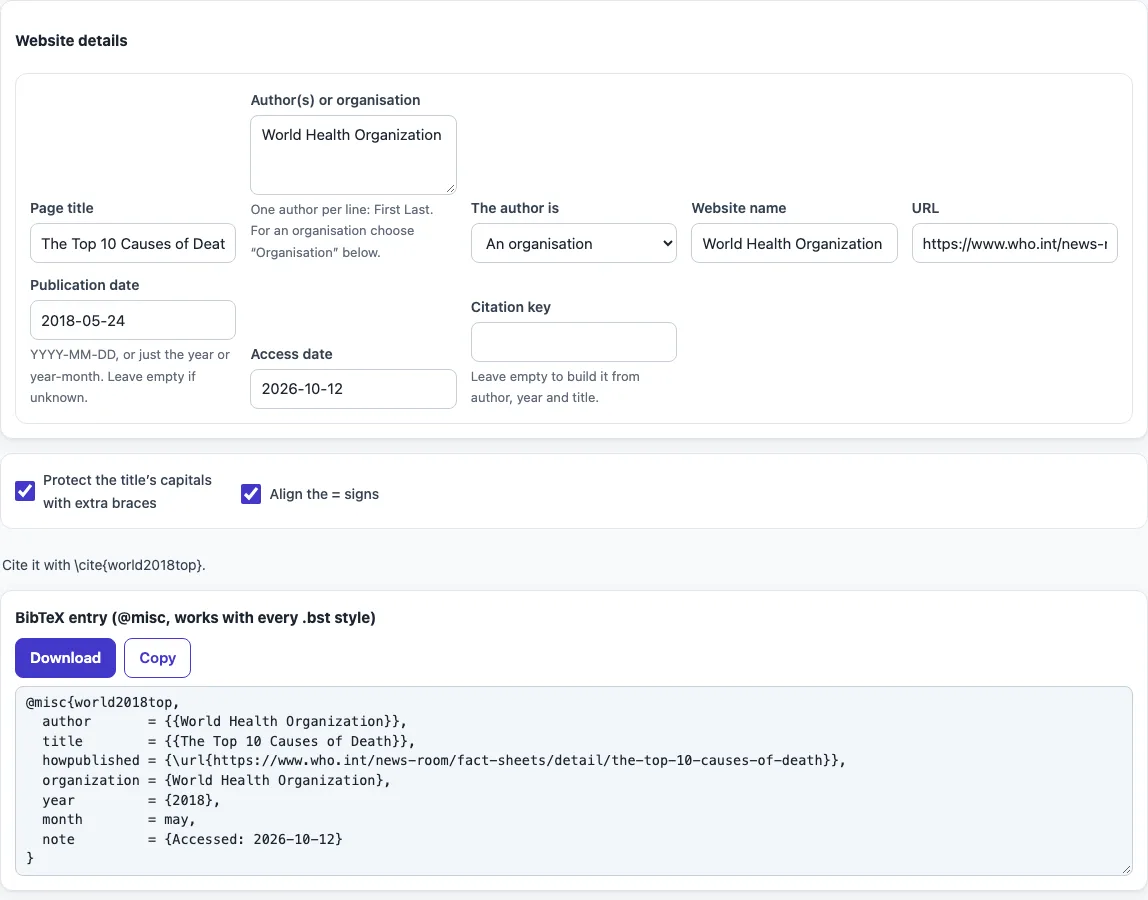
How to use the BibTeX Website Citation Generator
- Type the title of the page into Page title.
- In Author(s) or organisation, enter the person’s name or the organisation’s name. Set The author is to match what you entered.
- Enter the site’s name in Website name.
- Paste the full web address into URL.
- Enter the Publication date as YYYY-MM-DD, YYYY-MM or YYYY, depending on what the page shows.
- Check Access date. It is set to today by default. Change it if you read the page on another day.
- Optional: type a Citation key. Leave it empty to build one from the author, year and title.
- Tick Protect the title’s capitals with extra braces if capitals in the title, such as acronyms, should stay as written.
- Tick Align the = signs if you want the fields lined up in columns.
- Copy the @misc or @online entry from the output.
The result updates as you type or change an option. Your option choices are kept in the page address, so a bookmarked or shared link reopens the tool with the same settings. Your text is never added to the address.
Both entries share the same citation key, so you can switch between BibTeX and biblatex without changing your \cite commands.
How to cite a website in BibTeX?
To cite a website in BibTeX, create one entry that lists the author or organisation, the page title, the year and the URL, then cite it in your text with its key. The tool fills these fields from your inputs and gives the entry a key. With an empty key, the key is built from the author, year and title, such as united2024climate.
Should I use @misc or @online?
Use @misc when you compile with BibTeX and a standard style such as plain, abbrv, IEEEtran, apalike or natbib. Use @online when you compile with biblatex and Biber. The two entry types store the web details differently. In @misc, the URL goes into howpublished wrapped in \url, and the access date goes into note. In @online, the URL and access date have their own fields, url and urldate. Choose the type that matches your compiler, and do not mix them in one document.
How do I add the access date?
Enter the date you read the page in the Access date field. It defaults to today, so change it if needed. Web pages change or disappear, so the access date tells readers when the content was checked. In a @misc entry it appears as note = {Accessed: ...}. In an @online entry it appears as urldate.
Do I need to escape % or # in a URL?
No. Leave % and # as they are inside a URL. Inside \url, these characters are read literally, so escaping them would break the link. Add \usepackage{url} (or the hyperref package) to your preamble so that \url works.
What if the page has no author?
Use the organisation that publishes the page, such as a government agency or a company, and set The author is to An organisation. The name is wrapped in double braces so it stays whole. If there is no organisation either, leave the author empty; the citation key then starts with anon, for example anon2024climate.
Frequently asked questions
What is the difference between the page title and the website name?
The page title is the name of the specific page or article you are citing. The website name is the name of the site the page belongs to. Fill in both, because they are separate fields in the entry.
Why are organisation names wrapped in double braces?
An organisation as author is wrapped in double braces so BibTeX does not split its name into first and last names. This keeps the full name together in the reference.
Do I need to sign up or install anything?
No. The tool runs in your web browser, is free, and needs no account. What you type is processed on your own device and is not uploaded.
Can I use the generated entry in a published paper?
Yes. You may use the output for any purpose, including published papers and commercial work, and no attribution is required.
What if I only know the year of publication?
Enter the year alone as YYYY, or the year and month as YYYY-MM. The tool accepts these formats as well as the full YYYY-MM-DD date.
Can I use the entry with natbib or IEEEtran?
Yes. Use the @misc entry: classic BibTeX styles such as plain, abbrv, IEEEtran and the natbib styles print the howpublished URL and the access note.
Related tools
- BibTeX generator: create BibTeX entries for other source types, not just web pages.
- BibTeX formatter: tidy the layout of an existing BibTeX file.
- BibTeX to APA: convert a BibTeX entry into an APA-style reference.
- BibTeX to MLA: convert a BibTeX entry into an MLA-style reference.
- BibTeX to IEEE: convert a BibTeX entry into an IEEE-style reference.
- APA figure citation: cite a figure you took from a web page in APA style.