LaTeX Equation Editor
Type LaTeX math and watch it render as you type; insert templates with one click and copy the code or MathML.
The LaTeX equation editor is a free online math editor that renders your LaTeX code as a formula while you type. You enter a LaTeX equation, and a live KaTeX preview shows the result right away. If the code has a mistake, the error appears under the input and the page keeps working.
Templates for fractions, roots, sums, integrals, matrices, Greek letters, relations and arrows insert at the cursor, so you do not need to memorise every command. The tool also wraps your formula in inline math, display math, an equation environment or an align environment, and can copy it as MathML for Word or LibreOffice.
The tool runs entirely in your web browser. What you type is processed on your own device, nothing is uploaded, and no account or sign-up is needed.
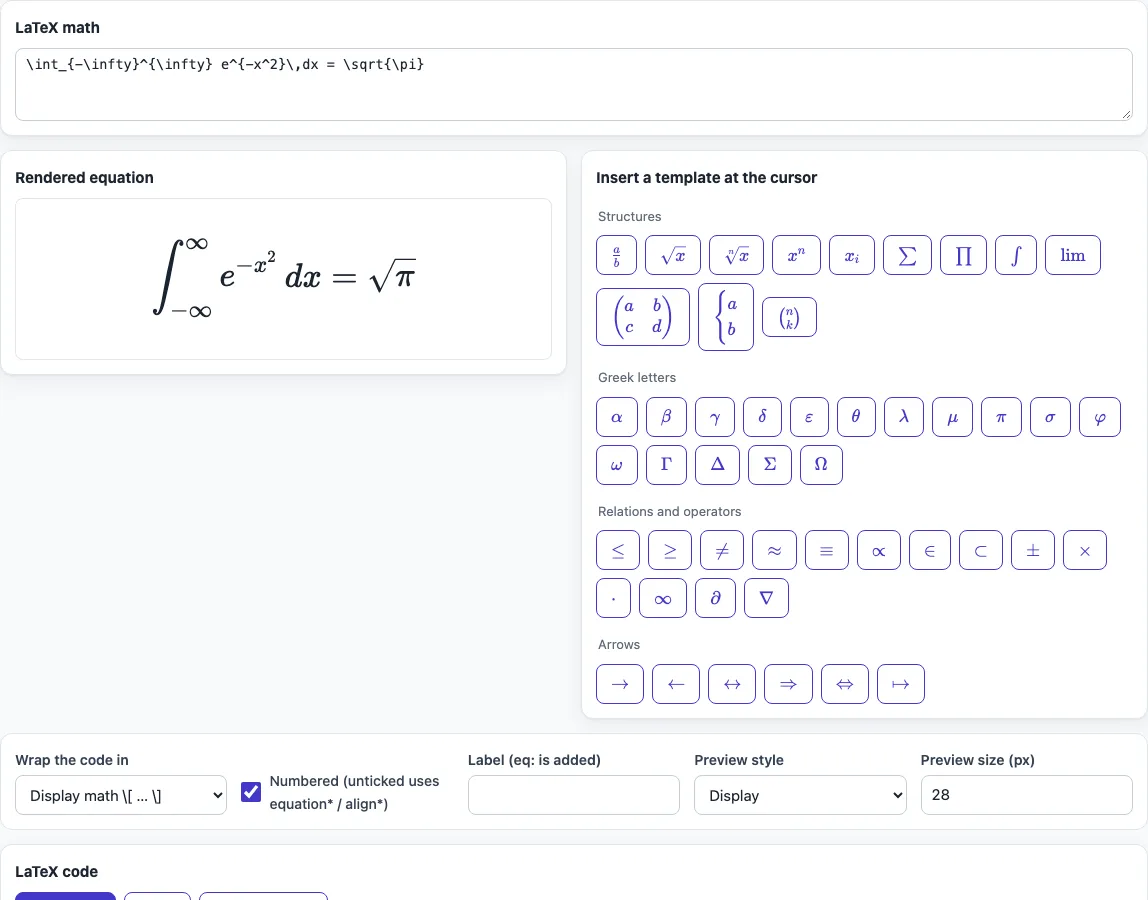
How to use the LaTeX equation editor
- Type your LaTeX math into the input box. The preview updates as you type.
- Check the preview. If something is wrong, read the KaTeX message shown under the input, and look at the Brace check, which counts unclosed or extra braces.
- To add a structure, place the cursor where you want it and click one of the about 50 template buttons. They are in four groups: Structures, Greek letters, Relations and operators, and Arrows. If you select text first, the template wraps that text.
- Set Preview style to display or inline, and set Preview size (px) to suit your screen.
- Under Wrap the code in, choose inline math
$…$, display math\[ … \], equation environment, or align environment. - Tick Numbered to use the numbered form. Leave it unticked to get the starred form, equation* or align*. Enter a Label if you want to refer to the equation later; the tool adds eq: to it.
- Copy the generated code into your document. To paste into Word or LibreOffice as an editable equation, use Copy MathML instead.
Your option choices stay in the page address, so a bookmarked or shared link opens the tool with the same settings. Your text is never put in the address.
How do I write an equation in LaTeX?
Put inline math between dollar signs, $x^2$, or display math between \[ and \]. Inside those markers, LaTeX uses backslash commands for symbols and structures, and curly braces {} to group the parts of a command.
Superscripts use ^ and subscripts use . A fraction is written \frac{a}{b}, a square root is \sqrt{x}, and a sum with limits is \sum{i=1}^{n}. Braces matter: x^{10} raises the whole 10 to a power, while x^10 raises only the 1, which then sits next to a 0. The same grouping rule applies to every command with arguments.
For a single equation on its own line, use the equation environment. For several lines that line up at a symbol, use the align environment, and mark the alignment point with &. The tool produces this for a simple case: x^2 in an equation environment with the label quad gives \begin{equation} x^2 \label{eq:quad} \end{equation}. The align environment and the starred forms need \usepackage{amsmath} in your document preamble. KaTeX supports most LaTeX math commands, but macros from packages such as TikZ are not supported.
How do I number an equation and refer to it?
Place the equation in an equation environment without the star, and add \label{eq:name} inside it. LaTeX numbers the equation automatically, and the label gives it a name you can use elsewhere.
To refer to it in your text, write \eqref{eq:name} with amsmath, which prints the number in parentheses, such as (1). Without amsmath, use \ref{eq:name}, which prints only the number. Label names must be unique in your document. The starred form, equation*, does not receive a number, so it cannot be referred to by number. LaTeX needs two compilation passes before the references show the correct numbers, so compile your document again if a reference shows ??.
As a LaTeX equation writer, the editor helps most with long formulas: the preview shows at once whether a brace closes in the right place.
Frequently asked questions
Can I paste a LaTeX equation into Word?
Yes, but not as raw code. Use Copy MathML in the tool. Microsoft Word and LibreOffice can paste MathML as an editable equation.
Why does my equation show an error?
The error message under the input comes from KaTeX and usually names the problem. Check the Brace check, which counts unclosed or extra braces. If you used a TikZ command or another package macro, KaTeX does not support it, so the preview shows an error even when your full document would compile.
Is the output free to use in a published paper?
Yes. The code, references and tables you generate may be used for any purpose, including published papers and commercial work, with no attribution.
Does the tool send my equations to a server?
No. The tool runs entirely in your web browser, so what you type is processed on your device and nothing is uploaded. You do not need an account or sign-up.
What is the difference between inline and display math?
Inline math, written $…$, sits inside a line of text. Display math, written \[ … \], sits on its own line. Choose the one that matches where the formula appears in your document.
Do I need amsmath for my equation?
You need it for the align environment, the starred forms, and \eqref. Add \usepackage{amsmath} to your preamble to use them. A plain equation environment works without it.
Related tools
- LaTeX table generator: use it when you need to build a table rather than a formula.
- LaTeX matrix generator: use it when your equation needs a matrix and you want the layout generated for you.
- LaTeX symbols: use it when you need to find the command for a symbol.
- Greek letters in LaTeX: use it when you need the command for a specific Greek letter.
- LaTeX fractions: use it when you are working on fraction layouts in detail.
- LaTeX font size: use it when you need to change the size of text in your document.