LaTeX Figure Generator
Enter your image file names and settings and copy a complete figure environment, including side-by-side subfigures.
The LaTeX figure generator writes the code for a figure in LaTeX: a figure environment that places an image with \includegraphics from the graphicx package. Enter your image file names, then set the size, crop, placement and caption, and the code updates as you change each option. It works for a single image or for several images placed side by side.
The tool runs entirely in your web browser. What you type is processed on your own device, nothing is uploaded, and no account or sign-up is needed. It is free.
The packages the code needs are listed above it, so you can add them to your preamble in one step.
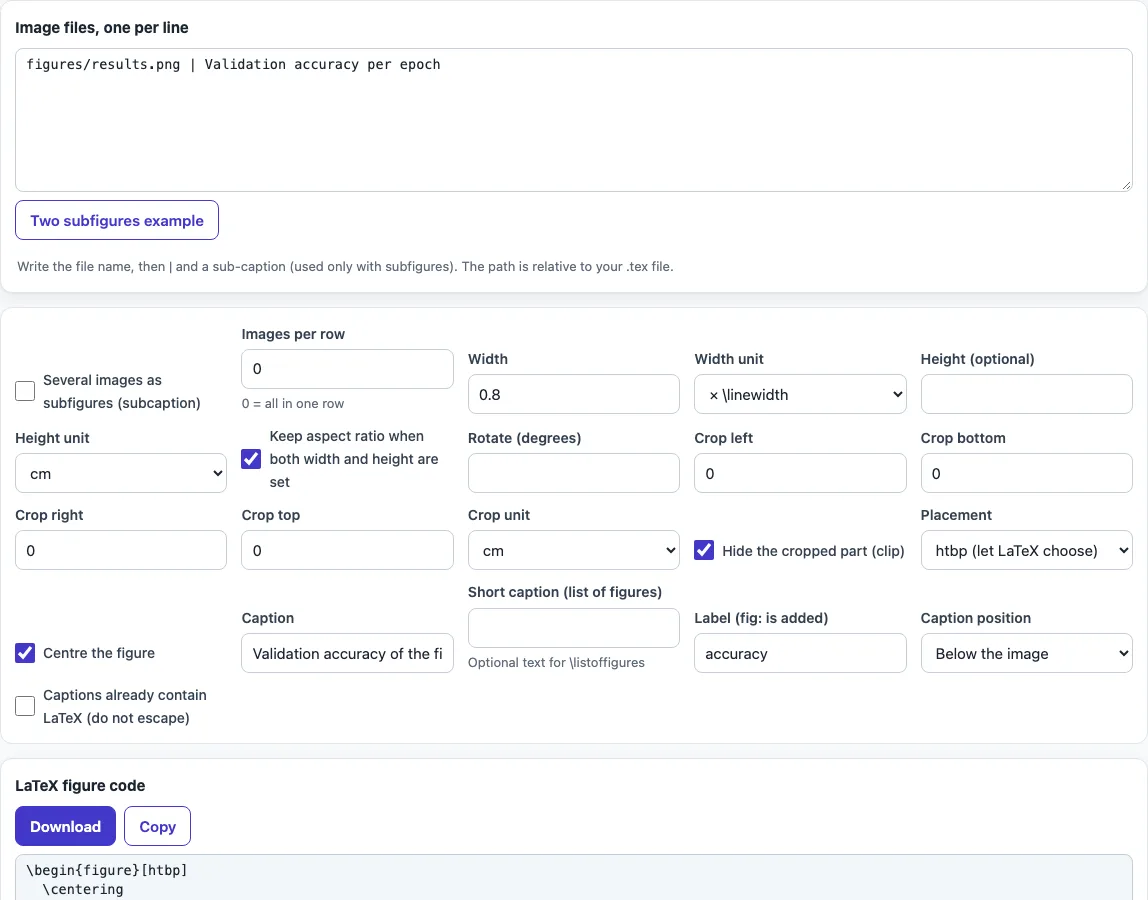
How to use the LaTeX figure generator
- In Image files, one per line, type the file name of each image, such as
chart.png. Use a path relative to your.texfile. Add| sub-captionafter a name if that image needs its own caption. A warning appears if a file name contains spaces. - Set Width with a unit: a multiple of
\linewidth,\textwidthor\columnwidth, or a length in cm, mm, in or pt. - Optionally set Height. If you set both, tick Keep aspect ratio when both width and height are set.
- Enter Rotate (degrees) if the image needs turning.
- For cropping, enter trim values for left, bottom, right and top. Tick Hide the cropped part (clip) to hide the removed area.
- Choose a Placement option:
htbp,h!,t,b,p, orH. - Tick Centre the figure, fill in Caption and, if you want, a Short caption (list of figures).
- Enter a Label (the tool adds
fig:, sosalesbecomesfig:sales) and pick Caption position. - For several images side by side, tick Several images as subfigures (subcaption) and set Images per row.
- Copy the code shown in the output. The packages it needs (graphicx, subcaption and float) are listed above the code.
The result updates as you type or change an option. Your choices are kept in the page address, so a bookmarked or shared link reopens the tool with the same settings. Your typed text is never put in the address.
How do I insert an image in LaTeX?
An image is inserted with a figure environment that contains \includegraphics. The command comes from the graphicx package, so the preamble of your document needs \usepackage{graphicx}. The file name in curly braces is the path to the image, relative to your .tex file, so an image in the same folder needs only its name.
The optional square brackets set the size. width=0.8\linewidth makes the image 80% of the line width. Relative units (\linewidth, \textwidth, \columnwidth) keep the image in step with the page layout, while absolute units (cm, mm, in, pt) fix the size. Setting both width and height stretches the image unless you keep its aspect ratio.
The caption and label come after the image. \caption{} gives the figure a number and a caption. \label{} must come after \caption{}, so that \ref points to the figure number. A single image from the tool looks like this:
\begin{figure}[htbp]
  \centering
  \includegraphics[width=0.8\linewidth]{chart.png}
  \caption{Sales by region}
  \label{fig:sales}
\end{figure}
How do I put two figures side by side?
Use subfigures. Load the subcaption package, then place each image in its own subfigure environment inside one outer figure. Each subfigure has its own \caption and \label, such as fig:name-a and fig:name-b. The outer figure can have one overall caption.
For two images per row, each subfigure has a width of 0.48\linewidth. Two of these sum to 0.96\linewidth, which fits on one line with a small gap. For three per row, use 0.32\linewidth. The tool puts \hfill between the subfigures, which spreads them across the line. You refer to each part separately, for example \ref{fig:name-a}.
Where does LaTeX put my figure?
A figure is a float: LaTeX moves it to the first place where it fits, following the placement letters. With htbp it may go here, at the top or bottom of a page, or on a page of floats. If figures drift too far, use h! or, as a last resort, H from the float package.
Frequently asked questions
How do I crop an image in LaTeX?
Enter trim values for left, bottom, right and top, each with a unit such as mm. The tool produces \includegraphics[trim=l b r t, clip]{file}. The clip option hides the part that is cut away.
How do I force a figure to stay here?
Choose placement H, which means exactly here. It needs the float package, which the tool lists above the code. Options such as h! only suggest the position, so LaTeX may still move the figure.
What does the warning about spaces in file names mean?
Spaces in file names can cause errors when LaTeX reads the image path. Rename the file with hyphens or underscores, such as sales-chart.png, and update the file name in the tool.
How do I refer to a figure in my text?
Write \ref{fig:sales} where you want the number to appear, for example “see Figure \ref{fig:sales}”. Use the same label you entered in the tool.
Does the tool upload my images?
No. Processing happens on your own device, nothing is uploaded, and you do not need an account.
Can I use the generated code in a published paper?
Yes. The output may be used for any purpose, including published papers and commercial work, with no attribution.
Related tools
- LaTeX table generator for building tables to place beside or below your figures.
- LaTeX long table for tables that run across several pages.
- LaTeX equation editor for writing equations to include in the text around a figure.
- LaTeX font size for changing text sizes in your document, including captions.
- APA figure format for setting up figures to APA style.
- APA figure citation for citing a figure you have used from another source.