LaTeX Font Size Commands and Points
See exactly how big each LaTeX size command prints in your document class and copy the code, or make any size with \fontsize.
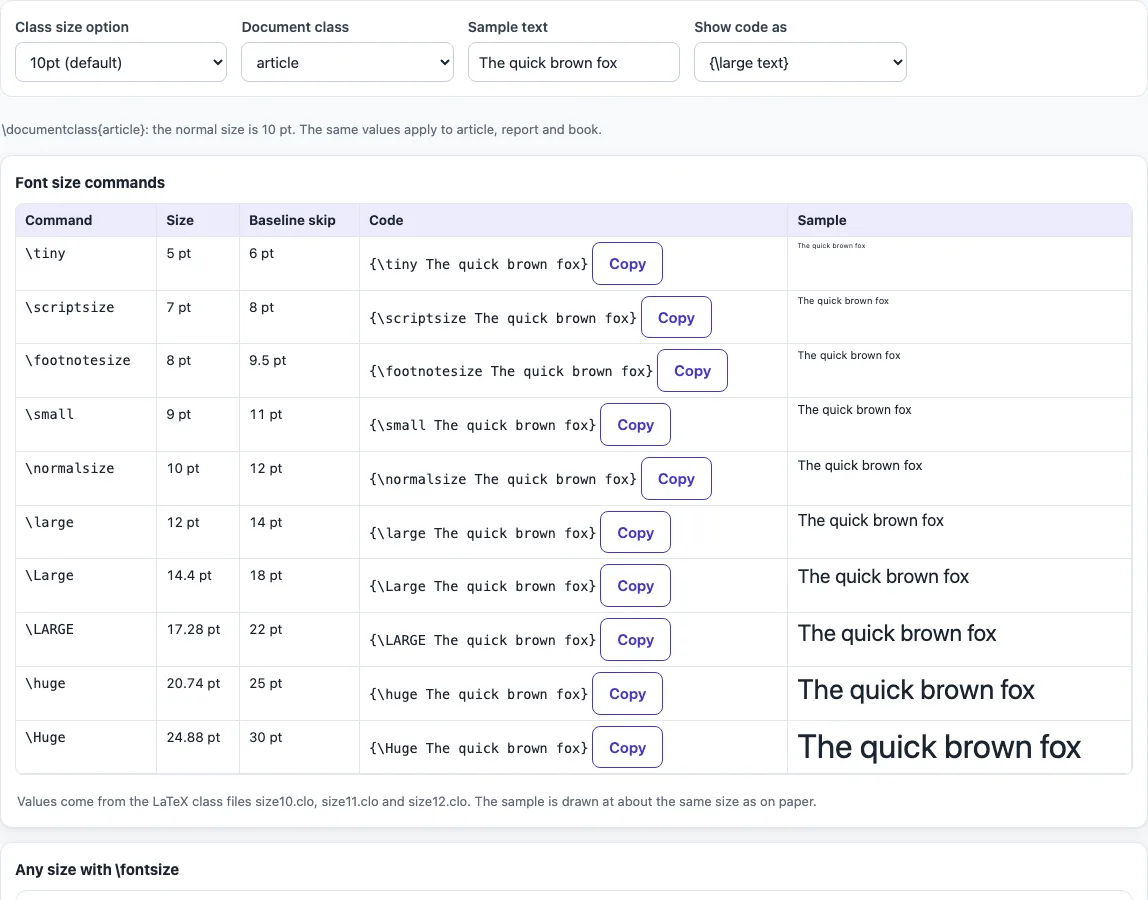
The LaTeX font size tool lists the ten LaTeX size commands, from \tiny to \Huge, with their point sizes and baseline skips, and gives you code you can copy into your document. It runs entirely in your web browser, so nothing you enter is uploaded. It is free, and you do not need an account or sign-up.
The tables follow the values in LaTeX’s own size files for the 10pt, 11pt and 12pt class options. The same values apply to the article, report and book classes. You can switch between class options and document classes, choose how the code is shown, or enter any size you need with \fontsize. Use it when you want to check how large a command will print before you add it to your document.
How to use the LaTeX font size tool
- Open the Class size option control and pick 10pt (the default), 11pt or 12pt. The table updates to show the sizes for that option.
- Choose a Document class: article, report or book. The sizes stay the same, but the choice matches the class you are writing in.
- Pick a Show code as format: group
{\large text}, environment\begin{large} … \end{large}, or switch\large text. - Find the command you need in the table. Each row shows its point size and baseline skip, plus a sample.
- Click the copy button on that row to copy the code.
- To set a size that is not in the table, enter a number in the size field and pick a unit (pt, bp or mm).
- Adjust the Line spacing factor if needed. The baseline skip is the size multiplied by this factor, and the default is 1.2.
- Copy the
\fontsizeline that appears and paste it into your document.
The result updates as you type or change an option. Your option choices are kept in the page address, so a bookmarked or shared link opens the tool with the same settings. Your text is never added to the address.
What are the font size commands in LaTeX?
LaTeX has ten size commands: \tiny, \scriptsize, \footnotesize, \small, \normalsize, \large, \Large, \LARGE, \huge and \Huge. They run from the smallest to the largest, and \normalsize is the size used for body text. Each command sets a font size and a baseline skip, which is the distance from one line of text to the next.
The actual sizes depend on the class size option. In the 10pt option, \normalsize is 10pt and \Huge is 24.88pt. In the 11pt and 12pt options, the body size and the top sizes change, so the same command can print at a different size in each option.
These commands are switches, not wrappers. A switch changes the size until the end of the current group or environment. If you write {\large text}, the larger size applies only inside the braces. If you write \large text on its own line, it applies until the next size command or the end of the group.
How big is \large in points?
In the 10pt class option, \large is 12pt, and its baseline skip is 14pt. In the 11pt option it is also 12pt, and in the 12pt option it is 14.4pt. The baseline skip is the spacing between lines at that size, so it is always larger than the font size.
Because \large is only one step above \normalsize, it is a common choice for subheadings or emphasis. If you need a size between two commands, use \fontsize, not a second command.
In the 11pt option \normalsize is 10.95pt, the 11pt step of LaTeX’s magnification scale, and in the 12pt option it is 12pt; \small and \footnotesize shift with it.
The size commands also scale math written in the same group, so {\large $x^2$} prints a larger formula. To return to the body size inside a larger block, use \normalsize.
Frequently asked questions
How do I change the font size of the whole document?
Set the size in the class options. For a 12pt document, write \documentclass[12pt]{article}. Replace article with report or book if you use those classes. The 10pt option is the default, so you do not need to add it.
How do I set a custom font size in LaTeX?
Use \fontsize with a size, a baseline skip and \selectfont. For example, \fontsize{14pt}{16.8pt}\selectfont sets 14pt text with a 16.8pt baseline skip. Computer Modern fonts exist only in fixed sizes, so for arbitrary sizes add \usepackage{anyfontsize} to your preamble, or use a scalable font such as lmodern.
Why does \huge look the same as \Huge in the 12pt option?
In the 12pt option, both \huge and \Huge are set to 24.88pt. LaTeX defines them that way in the size file for that class option. They differ only in the 10pt and 11pt options, where \Huge is larger.
Why does my size command stop working partway through my text?
A size command lasts only until the end of the group or environment it is in. If you wrote it inside braces or an environment, the size returns to the previous size after the closing brace or \end. Wrap the text in braces, as in {\large text}, to control exactly where it applies.
Can I use the table sizes in any document class?
Yes. The sizes for 10pt, 11pt and 12pt are the same for article, report and book. Only the class option changes the values, so you can choose the class that fits your project and still use the same table.
Related tools
- LaTeX table generator — Use this when you need to build a table with your own rows and columns.
- LaTeX long table — Use this when your table is too long to fit on one page.
- LaTeX equation editor — Use this when you need to write or check a mathematical formula.
- LaTeX symbols — Use this when you need to find the command for a special character.
- LaTeX figure generator — Use this when you want to insert an image with a caption and label.
- APA headings — Use this when your paper must follow APA heading levels.