LaTeX Fractions
Enter a fraction, decimal or ratio and copy the LaTeX code in every fraction style, with a rendered preview.
The LaTeX fractions tool turns a numerator and a denominator into LaTeX fraction code and shows a rendered preview as you type. It covers \frac, \dfrac, \tfrac, \cfrac, slash fractions, \nicefrac and \sfrac, and it also converts decimals, mixed numbers, expressions and continued fractions. The tool runs entirely in your web browser. What you type is processed on your own device, nothing is uploaded, and no account or sign-up is needed. It is free to use.
Every result has a rendered preview, so you can see the fraction before you paste the code into your document.
It is free and needs no sign-up.
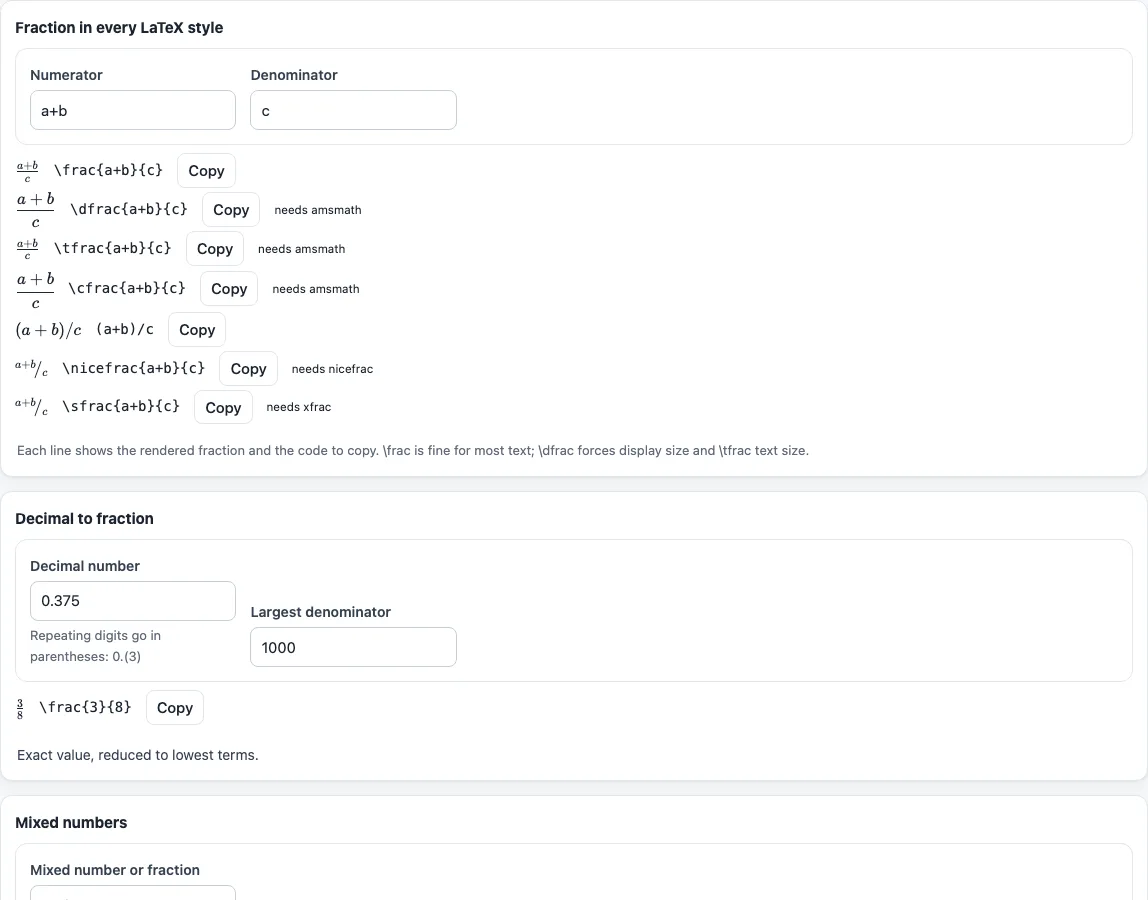
How to use the LaTeX fractions tool
- Find the section called “Fraction in every LaTeX style”.
- Type the top number in the numerator box and the bottom number in the denominator box.
- Compare the rendered preview with the code for each style:
\frac{3}{4},\dfrac{3}{4},\tfrac{3}{4},\cfrac{3}{4}, 3/4,\nicefrac{3}{4}and\sfrac{3}{4}. - Select and copy the code for the style you need.
- For a decimal, open “Decimal to fraction”, type the decimal, and set “Largest denominator” if you want an approximation.
- For a mixed number, open “Mixed numbers” and type a value such as 1 3/4.
- For an expression such as (a+b)/(c-d), open “Turn a/b into
\frac” and type it in. - For a continued fraction, open “Continued fraction” and enter a ratio such as 43/19 or a decimal.
The result updates as you type or change an option. Your option choices are kept in the page address, so a bookmarked or shared link reopens the tool with the same settings. Your text is never put in the address.
Each section works on its own: you can use only the decimal converter or only the continued fractions. Packages are named next to each style (amsmath for \dfrac, \tfrac and \cfrac; nicefrac and xfrac for the slanted forms), so you know what to add to your preamble before you compile.
How do I write a fraction in LaTeX
Use \frac{numerator}{denominator}. For example, \frac{3}{4} prints a stacked 3 over 4, and it needs no package. The braces mark where each part starts and ends, so anything longer than one character should go inside them.
If the top or bottom is an expression, put it inside its own braces and use parentheses to group terms: \frac{a+b}{c-d} gives (a+b) over (c-d). Note that A/B/C is read left to right, so 1/2/3 means (1/2)/3. If you mean 1 over 2/3, write it with \frac instead. The slash form 3/4 is plain text and stays on one line, which is useful when a fraction should not be stacked. The \nicefrac and \sfrac commands print a small slanted fraction, but they need the nicefrac and xfrac packages.
What is the difference between \frac, \dfrac and \tfrac
All three commands make a stacked fraction. They differ only in size. \frac chooses its size from context: in running text it uses the smaller text style, and in display math it uses full size. \dfrac always forces display size, and \tfrac always forces text size. Both \dfrac and \tfrac come from the amsmath package, so add \usepackage{amsmath} to your document before using them.
Use \dfrac when a fraction inside a sentence needs to be as large as a display fraction, such as in a sum that should stay readable. Use \tfrac when a fraction in a display equation should stay small, such as a fraction inside a subscript or a long line of formulas. Plain \frac is usually the right choice when you are not sure, because it adapts to the surrounding math.
How do I write a slanted fraction like ½ in text?
For a small, slanted fraction in running text, such as a recipe quantity or a dimension, use \nicefrac{1}{2} from the nicefrac package or \sfrac{1}{2} from the xfrac package. Both set the numerator raised and the denominator lowered around a slash, so the line spacing stays even. The plain slash form 1/2 needs no package and is the clearest choice when the fraction is part of a longer expression.
Frequently asked questions
How do I write a mixed number in LaTeX?
Write the whole number first, then the fraction part with \frac. For example, 1 3/4 becomes 1\frac{3}{4}. The “Mixed numbers” section of the tool does this conversion, and it also shows 7/4 as a mixed number.
How do I write a continued fraction in LaTeX?
Use \cfrac, which comes from amsmath, and nest one level inside the next. The expansion [2; 3, 1, 4] is written as 2 + \cfrac{1}{3 + \cfrac{1}{1 + \cfrac{1}{4} } }. Enter 43/19 in the “Continued fraction” section to get this code and the convergents.
Do I need a package to use \frac?
No. \frac works in standard LaTeX without any package. \dfrac, \tfrac and \cfrac need amsmath, \nicefrac needs the nicefrac package, and \sfrac needs the xfrac package.
How do I turn a decimal into a fraction in LaTeX?
Use the “Decimal to fraction” section. A terminating decimal gives an exact answer in lowest terms, so 0.75 becomes 3/4. Write repeating digits in parentheses, so 0.(3) becomes 1/3. For a value like 3.14159 with a limit of 1000 on “Largest denominator”, the closest fraction is 355/113.
Why does my fraction look small in my document?
Plain \frac in running text uses the smaller text style. Switch to \dfrac to force display size, or check that you are not inside an inline math environment. The difference is explained above under the \frac, \dfrac and \tfrac section.
Is the tool free, and is my text uploaded?
Yes, the tool is free and needs no sign-up. It runs in your browser, and what you type is processed on your own device, so nothing is uploaded. The code it produces can be used for any purpose, including published papers and commercial work, with no attribution.
Related tools
- LaTeX table generator — use it when your data needs rows and columns rather than a single fraction.
- LaTeX matrix generator — use it when you need a grid of values, such as a matrix containing fractions.
- LaTeX equation editor — use it when a fraction is one part of a longer equation you are building.
- LaTeX symbols — use it when you need a symbol to sit beside a fraction, such as an operator or relation sign.
- Greek letters in LaTeX — use it when your fraction uses Greek letters as variables.
- LaTeX font size — use it when you need to change the size of text around a fraction, not the fraction itself.