Long Table in LaTeX (longtable Generator)
Paste rows from a spreadsheet or CSV and get longtable code that repeats the header on every page.
The LaTeX long table generator turns rows of text into LaTeX code for a table that breaks across pages. Paste rows copied from a spreadsheet, as CSV or tab-separated text, and the tool builds a longtable environment from the longtable package. It runs entirely in your web browser, so what you type stays on your device. It is free, and no account or sign-up is needed.
Use it when a table is too long for one page of a report, thesis, or paper. The output can repeat the header on each page and add a “continued” note at the foot of each page, so readers always know which columns they are looking at.
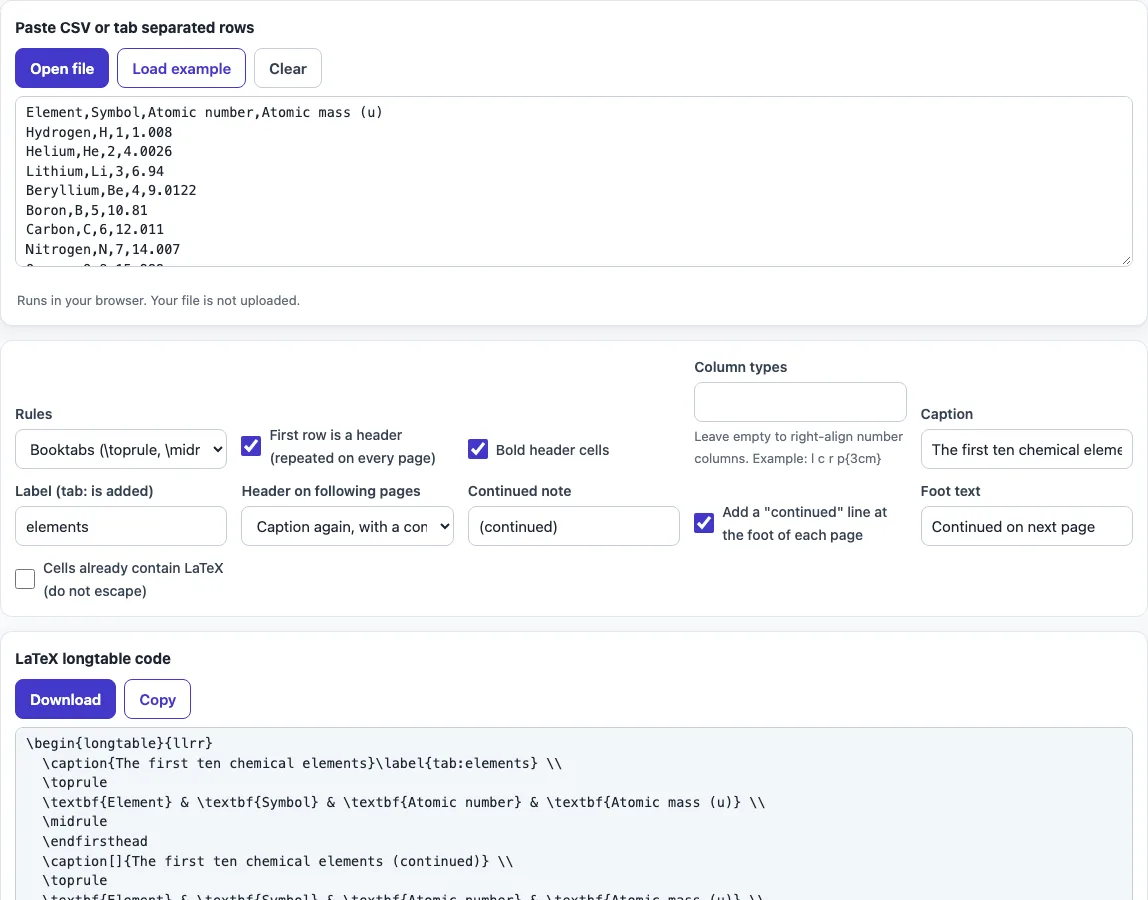
How to use the LaTeX long table generator
- Paste your rows into the input box, as CSV or tab-separated text. The result updates as you type.
- Tick “First row is a header (repeated on every page)” if the first row holds column names. Tick the bold option if you want the header in bold.
- Under “Header on following pages”, choose “Caption again, with a continued note”, “Table number row (manual style)”, or “Column header only”.
- Tick “Add a ‘continued’ line at the foot of each page” and edit the foot text if you want something other than “Continued on next page”.
- Pick a rule style: Booktabs, plain
\hline, or none. - Enter column types such as
l,c,r, orp{3cm}. Leave the field empty to right-align number columns. - Tick “Cells already contain LaTeX (do not escape)” only if your cells hold commands such as
\textbf{}. Otherwise special characters are escaped for you. - Copy the code from the output into your document.
Your option choices are kept in the page address, so a bookmarked or shared link reopens the tool with the same settings. Your pasted text is never put in the address. The generated code may be used for any purpose, with no attribution required.
How do I make a table that continues on the next page in LaTeX?
Use the longtable environment from the longtable package. Add \usepackage{longtable} to your preamble, and LaTeX will break the table across pages by itself. The table is not placed inside a table float, because floats cannot split across pages.
The generated code has a fixed order: the caption and label come first, then the header rows, then the data rows. Between the header and the data sit the markers that tell LaTeX what to repeat.
What do \endfirsthead and \endhead do?
\endfirsthead marks the end of the header block shown only on the first page of the table. \endhead marks the end of the header block repeated on every following page. A table that uses both looks like this:
\begin{longtable}{lr}
\caption{Sales by region}\label{tab:sales}\\
\toprule
Region & Sales \\ \midrule
\endfirsthead
\toprule
Region & Sales \\ \midrule
\endhead
\endfoot marks the foot shown at the bottom of every page except the last, and \endlastfoot marks the foot shown on the last page. The “continued” line uses \endfoot.
How do I repeat the header row on every page?
Place the header rows before \endhead, and longtable repeats them on each page after the first. The tool offers three ways to style that repeated header:
- Caption again, with a continued note: the caption is written as
\caption[]{...}with “(continued)” added. The empty optional argument keeps the list of tables clean. - Table number row (manual style): a line such as
\tablename\ \thetable{} -- continued from previous pagefollows the approach in the longtable manual. - Column header only: only the column names repeat.
Why are the column widths wrong on the first run?
longtable measures column widths across several LaTeX runs, because it needs to record the widths before it can use them. On the first run the widths are often wrong. Run LaTeX twice, or more, until the widths settle. If a column still wraps badly, give it a fixed width with p{3cm}, since a p column does not depend on the measured width.
Frequently asked questions
Can I use X columns from tabularx?
No. X columns belong to tabularx and are not allowed in longtable, so the tool uses l (left-aligned) in their place.
Do I need to wrap the table in a figure or table environment?
No. longtable is a float-free environment that breaks across pages by itself. Wrapping it in a table float would stop it from breaking.
Are my pasted rows uploaded anywhere?
No. The tool runs in your browser, and what you type or open is processed on your own device. Nothing is uploaded, and no account is needed.
Can I use the generated code in a published paper?
Yes. The output may be used for any purpose, including published papers and commercial work, with no attribution.
What happens to special characters such as % or &?
They are escaped so LaTeX prints them as text. If your cells already contain LaTeX commands, tick “Cells already contain LaTeX (do not escape)” so the commands are kept as written.
Can I add a caption and a label?
Yes. Fill in Caption and Label and they go into the first header block, so the table is numbered like any other and can be referred to with \ref{tab:name}.
Related tools
- LaTeX table generator: use it for short tables that fit on one page.
- LaTeX symbols: use it to find the command for a symbol to put in a table cell.
- LaTeX font size: use it to change text size when a table is too wide for the page.
- LaTeX figure generator: use it to place images with captions in your document.
- BibTeX formatter: use it to clean up references before you cite them in a table or paper.
- APA table format: use it when your table must follow APA style rules.