LaTeX Matrix Generator
Fill in the entries, pick the brackets and copy LaTeX matrix code, checked with a live rendered preview.
The LaTeX matrix generator turns a grid of entries into matrix code and shows a rendered preview as you type. You can use it to build pmatrix, bmatrix, determinant and augmented matrices without memorising the syntax. It is free, needs no account or sign-up, and runs entirely in your web browser, so what you enter is processed on your own device and nothing is uploaded.
You can set the size up to 12 × 12, start from a preset such as Identity or Zero, or paste rows of numbers separated by spaces, commas or tabs. The output is ready to paste into a LaTeX document that loads the amsmath package.
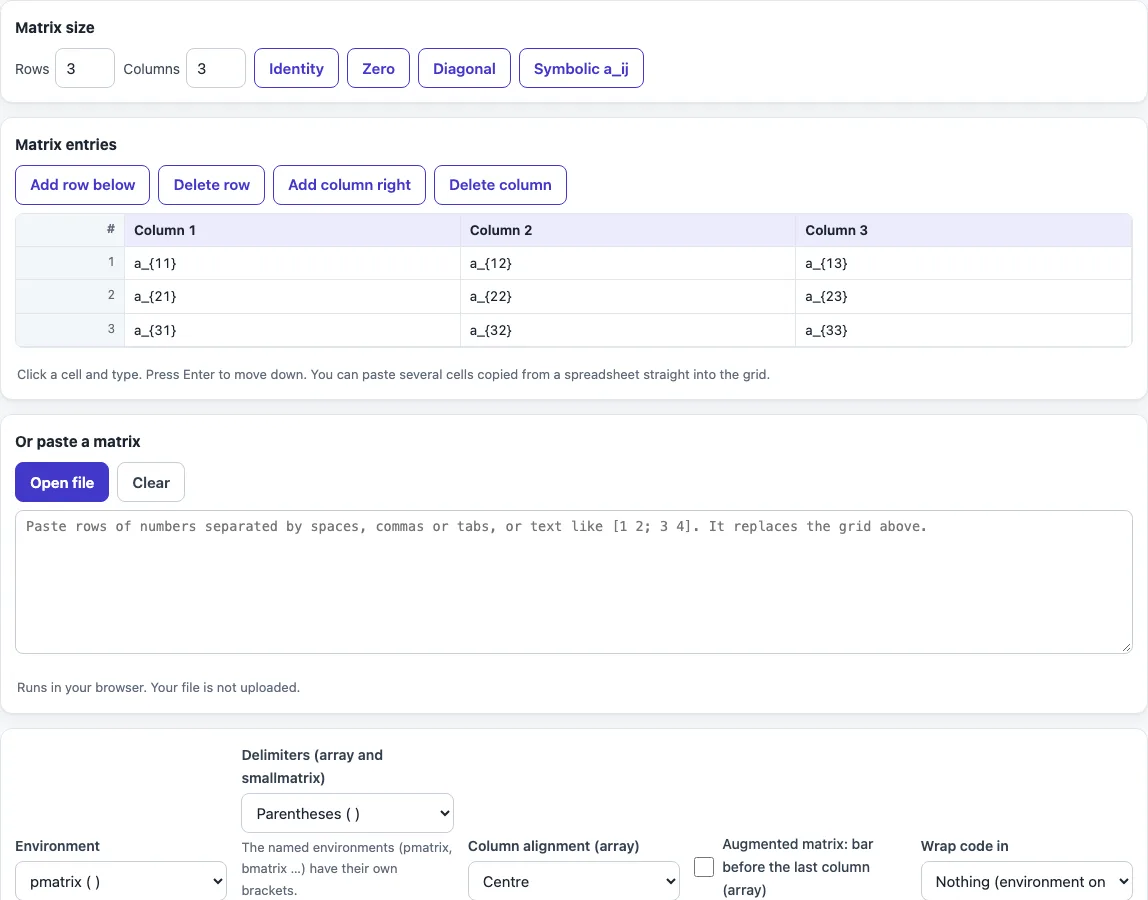
How to use the LaTeX matrix generator
- Set the matrix size in rows and columns, up to 12 × 12. Or click a preset: Identity, Zero, Diagonal or Symbolic a_ij.
- To use your own numbers, open “Or paste a matrix” and enter rows separated by spaces, commas or tabs, or text such as [1 2; 3 4]. Pasted text replaces the grid.
- Choose an environment. Use pmatrix for parentheses, bmatrix for square brackets, vmatrix for a determinant, or matrix for no delimiters.
- For array and smallmatrix, set Delimiters and Column alignment (centre, left or right).
- For an augmented matrix, tick “Augmented matrix: bar before the last column (array)”.
- Under “Wrap code in”, choose nothing, inline math
$…$or display math\[ … \]. - Check the rendered preview, then click Copy plain, Copy inline or Copy display.
The result updates as you type or change an option, so you can see each change straight away. Your option choices are kept in the page address, so a bookmarked or shared link reopens the tool with the same settings. Your entries are never put in the address.
The presets Identity, Zero, Diagonal and Symbolic a_ij fill the grid in one click; Symbolic writes entries such as a_{11}, a_{12} for textbook-style matrices. Copy plain, Copy inline and Copy display put the code on your clipboard with the math delimiters you need.
How do I write a matrix in LaTeX?
A matrix in LaTeX is written inside math mode, either inline between $ signs or in a display block between \[ and \]. The matrix itself is a named environment that opens with \begin{name} and closes with \end{name}, and the two names must match. Matrix environments come from the amsmath package, so add \usepackage{amsmath} to your preamble.
Inside the environment, & separates the entries in a row and \\ ends each row. The last row does not need \\ after it. For example:
\begin{matrix}
a & b \\
c & d
\end{matrix}
Each row has the same number of entries, and the environment lays them out in aligned columns. Entries can be numbers, letters or full expressions such as $x^2$ or $\frac{1}{2}$.
What is the difference between pmatrix and bmatrix?
pmatrix and bmatrix create the same grid of entries with different brackets around it. pmatrix draws round parentheses ( ), and bmatrix draws square brackets [ ]. The row and column syntax is identical, so you can switch between them by changing only the environment name:
\begin{pmatrix} 1 & 0 \\ 0 & 1 \end{pmatrix}
\begin{bmatrix} 1 & 0 \\ 0 & 1 \end{bmatrix}
The amsmath package also provides other delimiters. Bmatrix uses curly braces { }, vmatrix uses single bars | | for a determinant, and Vmatrix uses double bars ‖ ‖ for a norm. The plain matrix environment has no delimiters at all. Choose the bracket style that your course, textbook or publisher uses.
Use vmatrix for a determinant, for example \begin{vmatrix} a & b \\ c & d \end{vmatrix} = ad - bc, and the array environment when you need alignment or a vertical bar that the named environments cannot give.
Ellipses for large matrices are written with \cdots, \vdots and \ddots, which you can type straight into a cell.
To make a whole matrix bold, as some textbooks do for vector and matrix names, write the name, not the entries, in bold with \mathbf{A} or \boldsymbol{A} (amsmath/amsbsy).
Frequently asked questions
How do I make an augmented matrix in LaTeX?
Use the array environment with a column specification that includes a vertical bar. The bar is written as | in the specification, so {cc|c} draws two columns, a bar, and a third column. In the tool, select array and tick the augmented matrix option to add the bar before the last column.
How do I write a small inline matrix?
Use the smallmatrix environment inside inline math, for example $\begin{smallmatrix} a & b \\ c & d \end{smallmatrix}$. It fits within a line of text without making the line spacing too large. In the tool, choose smallmatrix as the environment and inline math as the wrap option.
Do I need to add a package to use matrices?
Yes. Add \usepackage{amsmath} to the preamble of your document. The example the tool produces, an identity matrix written with pmatrix, needs this package to compile.
Why does my matrix give an error?
The most common causes are a matrix placed outside math mode, a mismatched \begin and \end name, or a missing \\ between rows. Check that the environment sits inside $…$ or \[…\], and that every row except the last ends with \\.
Does the tool upload what I type?
No. The tool runs in your web browser, and what you type is processed on your own device. Nothing is uploaded, and you do not need an account.
Can I use the generated code in a published paper?
Yes. The output can be used for any purpose, including published papers and commercial work, and no attribution is required.
Related tools
- LaTeX table generator for building tabular layouts with rows and columns of text and numbers.
- LaTeX equation editor when you need to write or check a full equation that contains a matrix.
- LaTeX symbols when you need a symbol for a matrix entry or a surrounding formula.
- Greek letters in LaTeX when your matrix entries or indices use letters such as α or λ.
- LaTeX fractions when matrix entries contain fractions and you need the correct syntax.
- LaTeX font size when you need to change the size of a matrix or the text around it.