LaTeX Symbols: Searchable Math Symbol List
Find the LaTeX command for any math symbol by name, command or the character itself, and copy it with one click.
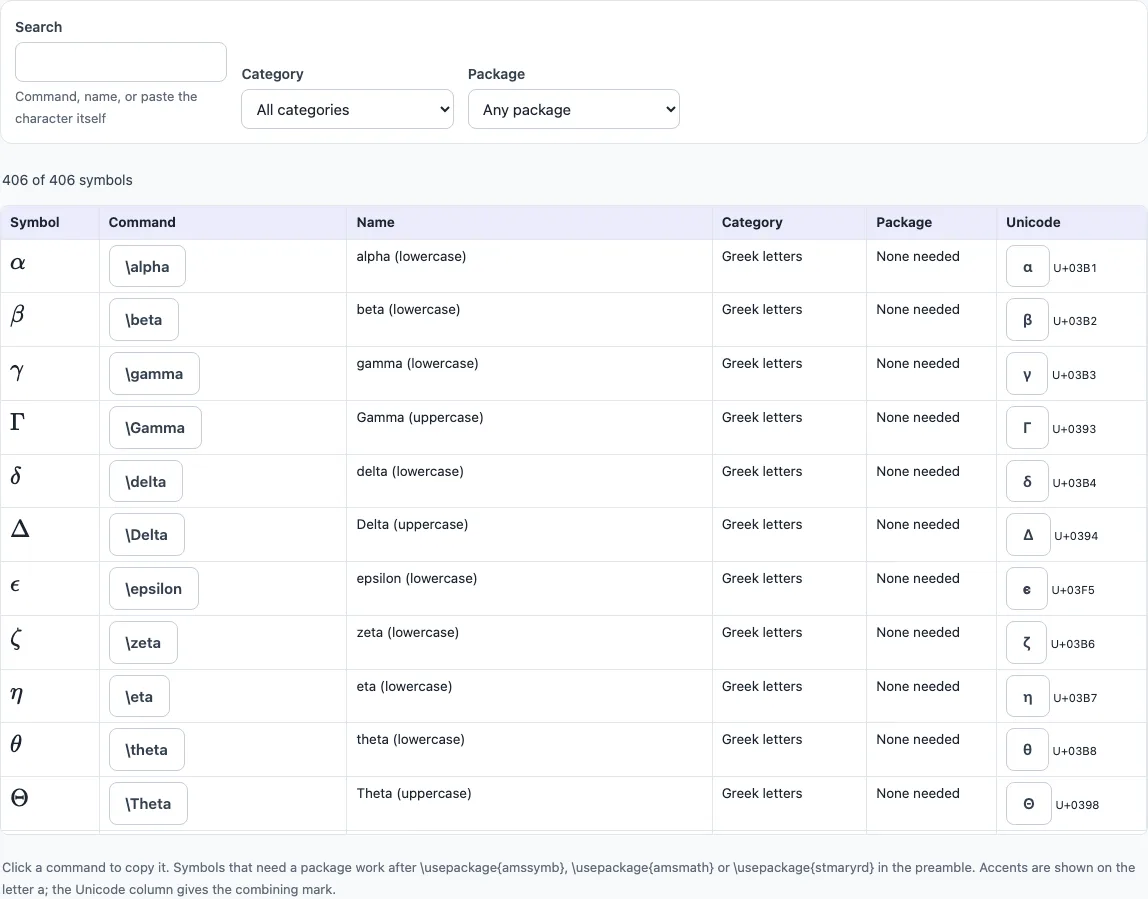
The LaTeX Symbols tool is a searchable list of 406 LaTeX math symbols. Each symbol is rendered with KaTeX and shown with its command, name, category, package and Unicode character, so you can find the exact code you need and copy it. It runs free in your web browser, and no account or sign-up is required.
The list is grouped into nine categories: Greek letters (42), relations (92), binary operators (55), arrows (72), delimiters (29), big operators (16), accents (19), sets and logic (23) and miscellaneous (58). You can search by command, name or character, or filter by category and package. Whether you are writing a thesis, a homework sheet or a blog post with equations, the list covers the symbols most people reach for.
How to use the LaTeX Symbols tool
- Click the Search box and type what you know. You can enter a command (such as
leq), a name (such asnabla), the character itself (such as ≤ or ∇), or a code point (such asU+2207). - Open the Category filter to narrow the results to one group, such as Greek letters, arrows or big operators.
- Open the Package filter to show only symbols that need no package, or only those that need amssymb, amsmath or stmaryrd.
- Check the rendered symbol, then read its command, name, category, package and Unicode character.
- Click the command or the character to copy it.
- Paste the command into your LaTeX file, inside math mode (between
$signs or inside\[ … \]).
Results update as you type or change a filter. Your search and filters are kept in the page address, so a bookmarked or shared link opens the same list of symbols.
Each row shows the symbol drawn by KaTeX, so what you see is what LaTeX prints. The count above the table tells you how many of the 406 symbols match your search. Copying puts only the command on your clipboard, without dollar signs, so you can paste it into an existing formula.
How do I find the LaTeX command for a symbol?
Search for the symbol using whatever you already know: its name, a rough command, or the character itself. If you can see the symbol in a document but do not know its command, paste the character into the search box, and the list will show the matching entry, such as \nabla for ∇.
Most LaTeX commands are a backslash followed by a name. Greek letters use their English names, with a capital letter for the uppercase form. For example, \alpha gives α and \Gamma gives Γ. Many relation and operator commands are short descriptive words, such as \leq for ≤ or \infty for ∞. If a name does not match, try a shorter word, or search by the character.
Which package do I need for a symbol?
Many symbols need no package, and the tool lists “none needed” for them. Others need one of three packages: amssymb, amsmath or stmaryrd. The tool shows which one applies to each symbol, so check the package column before you write your document.
To load a package, add a line such as \usepackage{amssymb} in the preamble, which is the part of the file before \begin{document}. For example, \leqslant needs amssymb, and \mathbb{R} (ℝ) also needs amssymb. Every symbol in the list was checked to render with KaTeX, and the ones that need a package work once you load it.
Are LaTeX math symbols the same as TeX math symbols?
Yes. LaTeX is built on TeX, and most LaTeX mathematical symbols are plain TeX commands, so \alpha, \leq or \infty work the same in both. The extra symbols from amssymb and stmaryrd are LaTeX packages; plain TeX users load the AMS fonts in another way.
Text-mode symbols, such as the section sign § or the copyright sign ©, are not math symbols and are not in this list; in text use \S and \copyright.
Frequently asked questions
How do I write the floor symbol in LaTeX?
Use \lfloor x \rfloor to produce ⌊x⌋. Replace x with your own expression, and keep the code inside math mode.
How do I write nabla in LaTeX?
Use \nabla, which produces ∇. It is the symbol for the gradient operator in vector calculus. Paste ∇ into the search box if you want to confirm the command.
How do I write the ceiling symbol in LaTeX?
Use \lceil x \rceil to produce ⌈x⌉. It works the same way as the floor brackets, so you can replace x with any expression.
Do I need math mode to use LaTeX symbols?
Yes. Math symbols only render in math mode. Put them in a sentence between $ signs, such as $\leq$, or inside \[ … \] for a display equation on its own line.
What is the difference between \leq and \leqslant?
Both are “less than or equal to” relations. \leq (≤) needs no package, while \leqslant is a slanted variant that needs amssymb. Check the package column in the tool before choosing one.
Can I find a symbol by pasting it?
Yes. Paste the character, such as ≠ or ∂, into the search box and the matching command appears, here \neq and \partial.
Related tools
- LaTeX table generator — Use it to build a table without writing the tabular code by hand.
- LaTeX matrix generator — Use it when your math needs a matrix with rows and columns of symbols.
- LaTeX equation editor — Use it to build and check a full equation that uses these symbols.
- Greek letters in LaTeX — Use it when you need only the Greek letter commands and their variants.
- LaTeX fractions — Use it to write fractions, which often sit next to symbols in formulas.
- LaTeX font size — Use it to change the size of text and equations in your document.