MLA Header Generator: Last Name and Page Number
Type your last name to see the MLA running header on every page, then follow the Word, Google Docs or LaTeX steps to add it.
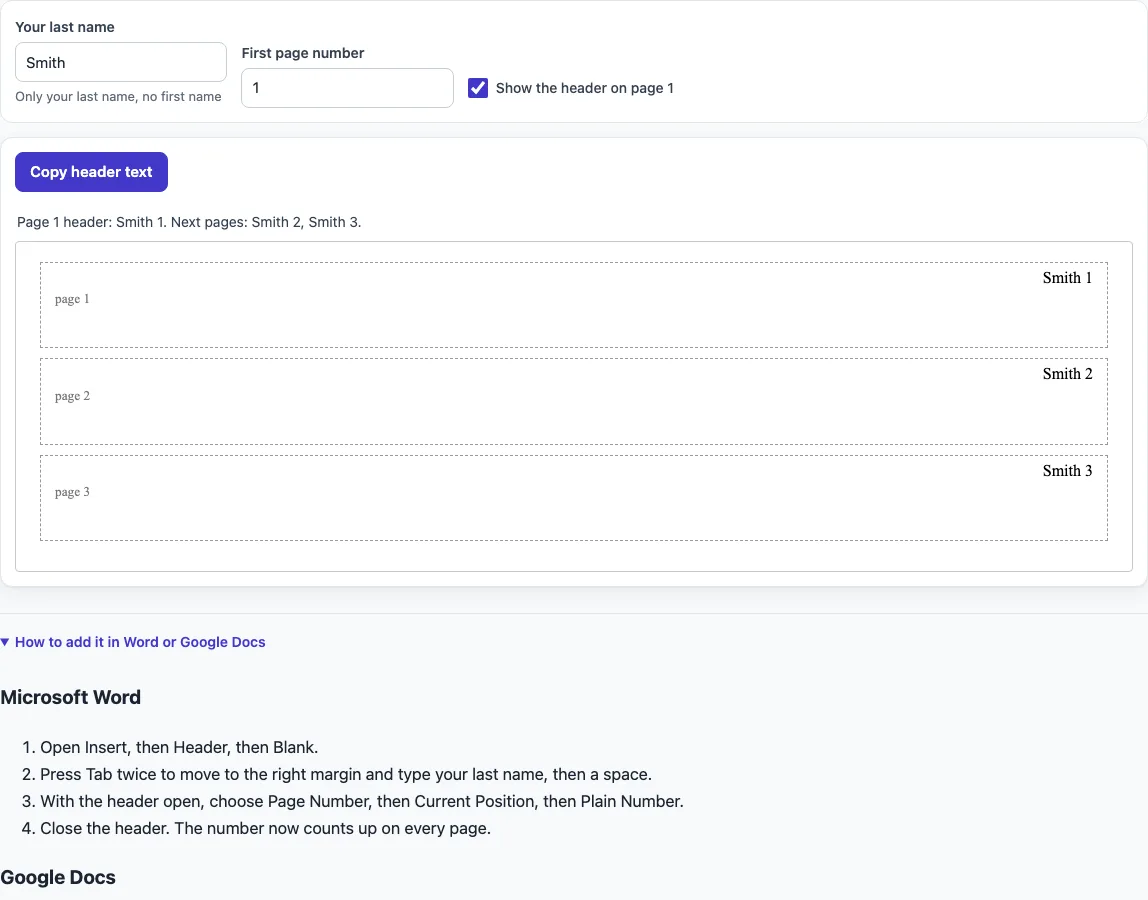
How to use the MLA Header Generator
- Type your last name in the last name field. Use your last name only, not your first name.
- Optionally, enter the first page number. Leave it at 1 for a new paper, or enter a number such as 5 if the paper continues numbering from earlier pages.
- Tick or untick “Show the header on page 1.” Tick it if your instructor wants the header on every page, and untick it if your instructor asks you to leave page 1 without one.
- Check the preview. For Smith starting at 1, it shows Smith 1, Smith 2, and Smith 3.
- Choose how you will add the header. The tool lists step-by-step instructions for Word and Google Docs, and it gives LaTeX code that uses the fancyhdr package.
- Click Copy header text to copy the header text, then paste it into your document. In Word and Google Docs, paste it inside the header area at the top of the page, then add the page number as described in the steps for your program.
- Open the steps for Word or Google Docs below the preview and follow them in your document. For LaTeX, copy the code from the LaTeX section and put the first part in your preamble.
Your entries stay in the browser and are not written to the page address. Reloading the page resets the fields.
What goes in an MLA header?
An MLA header holds two things: your last name and the page number, separated by one space. Leave out your first name, your instructor’s name, the course, and the paper title. Those details belong in the heading on the first page, which is a separate block of text.
The number uses Arabic numerals, such as 1, 2, and 3, with no “p.” in front.
Where do I put the page number in MLA?
Put the page number in the upper right corner, flush with the right margin and half an inch from the top of the page. Your last name sits on the same line, just before the number, so each page reads something like “Smith 3.” This placement is the standard mla running head for MLA papers.
The header sits in the page’s top margin, not in the body text, so it does not move your double-spaced text.
How do I make an MLA header in Word?
Word keeps headers in a separate area above the body text, so you must insert the header first and type inside it. The steps in the Chesapeake College guide press Tab twice inside the Blank header to reach the right margin before typing the last name.
Use Word’s page number field rather than typing the numbers yourself. The field updates automatically when pages are added, removed, or moved, so the header stays correct as you edit the paper.
How do I make an MLA header in Google Docs?
Google Docs also places the header in a separate area, and the page number is inserted as a field. The field counts pages for you, so the numbers stay in order as you write.
Google’s own help covers the number but not the name. You need to type your last name by hand in front of the number, with one space between them. In the header options, the Different first page setting leaves page 1’s header blank, which is useful if your instructor asks you to omit it.
Do I put the header on the first page?
Usually yes. The MLA running header appears on every page, including page 1, unless your instructor says otherwise.
Check your assignment instructions first. Use the “Show the header on page 1” checkbox in the tool to match the choice. In Word and Google Docs, the different first page setting does the same job.
Sources
Checked 18 October 2026: the UCF MLA 9 guide (heading order, header position, margins, font); the Chesapeake College LRC MLA header guide (page last updated 25 February 2026: no title page unless requested, Word header steps); the UGA CURO MLA title style guide (title capitalization); the Google Docs Help page on page numbers (read 18 October 2026). The MLA Style Center page on formatting a paper only points to a sample chapter of the MLA Handbook Plus, so these university guides that follow the MLA Handbook, 9th edition, are the sources. Your instructor’s requirements come first.
Frequently asked questions
Is the MLA header the same as the MLA heading?
No. The header is the running text in the upper right corner, made of your last name and page number. The heading is the block on page 1 that lists your name, instructor, course, and date.
Should my first name appear in the header?
No. The guides call for your last name only, with one space before the page number.
Do I type “p.” before the page number?
No. MLA uses the number alone, such as “Smith 4.” The guides do not describe a “p.” before it.
What page number should I start with?
Start at 1 for a new paper. If the paper continues numbering from an earlier part, enter the next number in the starting page number field, such as 5, and the preview will update.
Can I remove the header from page 1?
Yes, if your instructor asks you to. Untick “Show the header on page 1” in the tool, and the preview will show pages 2 and 3 with the header only.
Does the header change the margins or font?
No. The header sits in the top margin. MLA also asks for 1-inch margins, a readable font such as Times New Roman at 11 to 13 point, and double spacing, which you set separately in your document.
Why does the LaTeX code include a line about the page number starting at a different value?
When you enter a start number other than 1, the tool adds a line that sets the page counter to that number. This keeps the numbers in the header matching your starting value.
Related tools
- MLA heading: Use this when you need the name, instructor, course, and date block that appears on page 1.
- MLA title page: Use this if your instructor asks for a separate title page instead of the page 1 heading.
- APA headings: Use this if your paper follows APA style, which uses its own rules for headings.
- LaTeX font size: Use this when you need to set the font size in a LaTeX document, such as the 11 to 13 point range MLA suggests.