MLA Title Page Generator
MLA does not need a title page, but if your course asks for one, type the details and get a clean MLA cover page to copy.
This MLA title page tool builds a separate title page for papers whose courses ask for one. You type your name, instructor, course, date and paper title, and the tool lays them out in MLA style in a page-like preview. It runs free in your browser, with no sign-up and nothing uploaded.
Use it when your instructor asks for a cover or title page, or when you are writing a group paper. If your class does not ask for one, MLA 9 does not require it, and the heading goes on the first page of the paper instead. The tool also gives you the option of a running header with your last name and page number, so the finished pages match what your instructor expects.
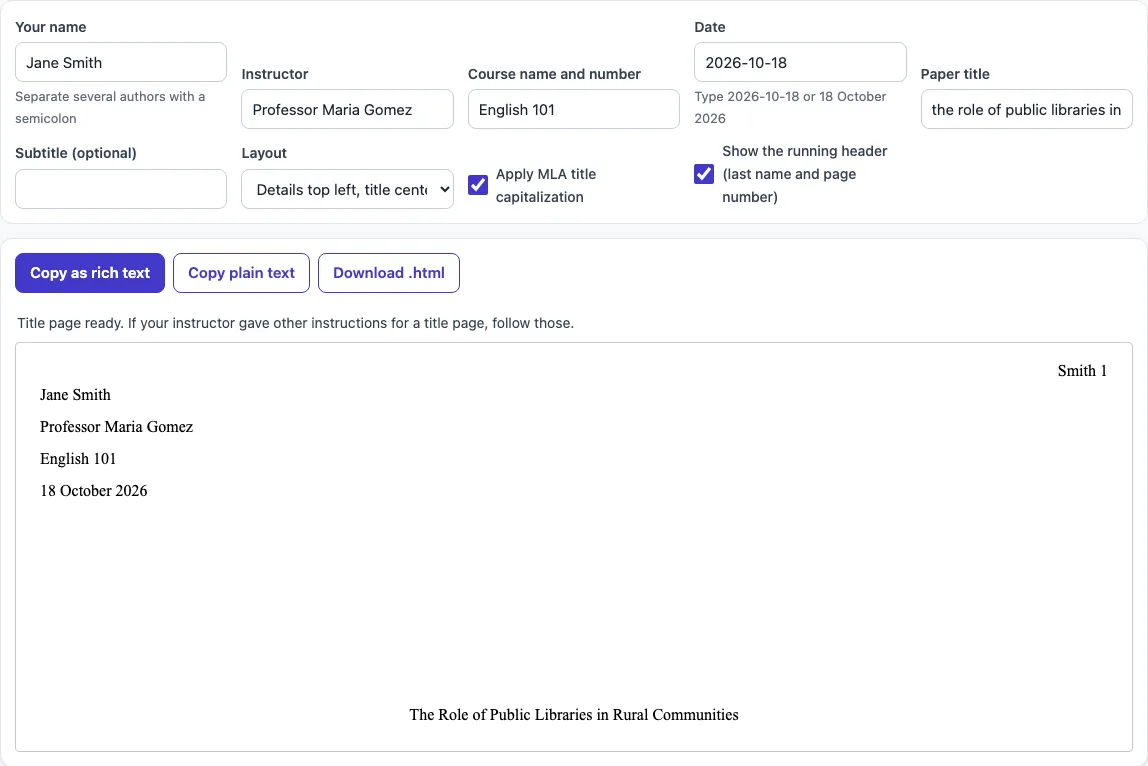
How to use the MLA title page tool
- Type your name in Your name. For several authors, separate the names with a semicolon, for example “Jane Smith; Omar Lee”. Each name gets its own line.
- Enter your teacher’s name in Instructor.
- Enter the course name and number in Course name and number.
- Enter the date in Date. Type it as day, month, year. Typing 2026-10-18 shows 18 October 2026.
- Enter your title in Paper title. Add a Subtitle only if your paper has one.
- Choose a Layout: “Details top left, title centered” is the default, or pick “Everything centered”.
- Leave Apply MLA title capitalization on to capitalize the title by MLA rules.
- Leave Show the running header (last name and page number) on if your instructor wants a header with your last name and page number.
- Check the preview. It shows the page as it will look.
- Click Copy as rich text to paste into Word or Google Docs with the Times New Roman, double-spaced layout kept. You can also choose Copy plain text or Download .html.
To print, use your browser’s print command: only the paper preview prints. Your entries are not written to the page address, and reloading the page resets the fields.
Does MLA require a title page?
No. MLA 9 does not require a title page. The first page of the paper carries the heading instead, with your name, instructor, course and date at the top left. Make a separate title page only if your instructor asks for one, or when you are writing a group paper and want to list all the authors clearly.
What goes on an MLA title page?
A title page holds the same information as an MLA heading, plus a centered title. It includes your name, your instructor’s name, the course name and number, and the date. The title goes centered about halfway down the page, in title capitalization. Do not use bold, italics, underline, quotation marks or all caps for the title. If the title includes another work’s title, italicize that part or put it in quotation marks, as you would in the body text.
The default layout puts the details on separate double-spaced lines at the top left. The “Everything centered” layout centers the details too. Some instructors prefer one or the other, so follow their instructions if they give any. If an instructor requires a title page, the Chesapeake College LRC guide says to follow those instructions, and the full title goes in the center of the page after the header and left-margin information.
For example, the tool’s default sample gives these details at the top left:
- Jane Smith
- Professor Maria Gomez
- English 101
- 18 October 2026
and then the title, centered lower on the page: The Role of Public Libraries in Rural Communities.
The running header at the top right reads “Smith 1”. It uses your last name, one space, then the page number. It sits flush with the right margin, half an inch from the top, and appears on every page. Use Arabic numerals with no “p.” before the number.
Keep the rest of the paper in MLA format: 1-inch margins on all sides, a readable font such as Times New Roman at 11 to 13 point, double spacing throughout, and a first-line indent of 0.5 inch for each paragraph.
Sources
Checked 18 October 2026: the UCF MLA 9 guide (heading order, header position, margins, font); the Chesapeake College LRC MLA header guide (page last updated 25 February 2026: no title page unless requested, Word header steps); the UGA CURO MLA title style guide (title capitalization); Scribbr for the common title page layout (read through a search summary on 18 October 2026, the page itself blocked direct reading). The MLA Style Center page on formatting a paper only points to a sample chapter of the MLA Handbook Plus, so these university guides that follow the MLA Handbook, 9th edition, are the sources. Your instructor’s requirements come first.
Frequently asked questions
How do I format an MLA cover page?
Put your name, instructor, course and date at the top left, double-spaced. Center the title about halfway down the page, in title capitalization, with no bold, italics or underline. Add a running header with your last name and page number at the top right if your instructor asks for one.
Does an MLA title page have a header?
It can. Many MLA papers use a running header in the upper right corner, half an inch from the top, with your last name and page number, such as “Smith 1”. Check whether your instructor wants it. This tool includes it as an option.
Is an MLA cover page the same as an MLA title page?
Yes, for this tool. The guides read do not describe a separate MLA cover page format, so a cover page and a title page are treated as the same thing.
Can I list several authors on an MLA title page?
Yes. Type each name on its own line in the tool by separating the names with a semicolon. The running header uses the first author’s last name.
How should I write the date on an MLA title page?
Write the date in day, month, year order, such as 18 October 2026. The tool shows the date in this order when you type it that way.
Does this tool create LaTeX code?
No. This page does not output LaTeX. For a LaTeX starter for an MLA heading, use the MLA heading page instead.
Related tools
- MLA heading: Use this when your instructor wants the heading on the first page of the paper rather than a separate title page.
- MLA header: Use this to set up the running header with your last name and page number on each page.
- BibTeX to MLA: Use this to convert BibTeX citation entries into MLA-style citations for your works cited list.
- APA headings: Use this if your paper follows APA style instead of MLA.